


What DocumentDb Does
Most apps end up with the same data layer problems: an object graph that doesn’t fit flat tables, a migration for every new field, then search, audit history, encryption, events and an API bolted on as separate libraries. Shiny.DocumentDb gives you all of that as one library on top of the database you already run. This page shows what it does, one capability at a time, with the code for each.
Store and query
Section titled “Store and query”A document is your object — nested addresses, child collections and all — saved as one JSON document. There
is no CREATE TABLE, no mapping, and no migration when you add a property. Queries are ordinary LINQ, including
over nested collections, and are translated to the database’s own query language rather than run in memory.
public class Order{    public Guid Id { get; set; }                 // generated on insert    public string Customer { get; set; } = "";    public string Status { get; set; } = "open";    public Address ShipTo { get; set; } = new();    public List<OrderLine> Lines { get; set; } = [];}
await store.Insert(order);                        // the whole graph, one write
var bigOpenOrders = await store.Query<Order>()    .Where(o => o.Status == "open" && o.Lines.Any(l => l.Price > 100))    .OrderBy(o => o.Customer)    .Paginate(0, 20)    .ToList();
Projections, aggregates, GroupBy, bulk ExecuteUpdate / ExecuteDelete, JSON indexes, and units of work
are all on the same fluent surface. The same code runs on every provider — only the registration changes.
CRUD · Querying · Aggregates · Indexes & transactions · Typed context
Search
Section titled “Search”Three kinds of search, each backed by the database’s own index — pgvector, DiskANN, FTS5, tsvector, GiST,
R*Tree, 2dsphere and friends — not a second search service you have to keep in sync.
Find the documents closest in meaning. Pair it with Microsoft.Extensions.AI and embeddings are generated
on every write.
opts.ConfigureDocument<Article>(cfg =>    cfg.MapVectorProperty(a => a.Embedding, dimensions: 1536, metric: VectorDistance.Cosine));
var hits = await store.Query<Article>() .Where(a => a.Tenant == tenantId) .NearestVectors(queryEmbedding, k: 10);Relevance-ranked keyword search, with an optional pre-filter.
opts.ConfigureDocument<Article>(cfg => cfg.MapFullTextProperty(a => a.Body));
var hits = await store.FullTextSearch<Article>("orleans persistence", maxResults: 20);foreach (var hit in hits) Console.WriteLine($"{hit.Score:F2} {hit.Document.Title}");Radius, bounding box, nearest neighbour, and full OGC geometry predicates.
var nearby = await store.WithinRadius<Restaurant>(    new GeoPoint(45.5231, -122.6765),   // Portland, OR    5000,                               // metres    filter: r => r.Cuisine == "Italian");
foreach (var result in nearby) Console.WriteLine($"{result.Document.Name} — {result.DistanceMeters:N0}m away");History and data protection
Section titled “History and data protection”Know what a document looked like last Tuesday, undo a bad write, keep deleted rows recoverable, and make sure a leaked backup doesn’t leak the sensitive fields.
Opt a type into append-only versioning; every write records a snapshot.
opts.ConfigureDocument<Order>(cfg => cfg.MapTemporal(o => o.Retention = TimeSpan.FromDays(90)));
var temporal = (ITemporalDocumentStore)store;var versions = await temporal.History<Order>(orderId);        // every version, oldest firstvar lastWeek = await temporal.AsOf<Order>(orderId, when);     // state at a point in time
Diff two versions, restore one, or ask what a given user changed. Temporal history
Remove sets a flag instead of deleting, and every read hides flagged documents.
opts.ConfigureDocument<Customer>(cfg => cfg.AddSoftDelete(x => x.IsDeleted));AES-256-GCM ciphertext wherever the property is stored — including history and backups — with no change to how you read or write.
opts.UseEncryptor(new AesGcmDocumentEncryptor("k1", key));opts.ConfigureDocument<Patient>(cfg => cfg.MapProperty(x => x.Ssn, p => p.Encrypt()));Events and messaging
Section titled “Events and messaging”“Save the order, then publish OrderPlaced” is two writes, and one of them eventually fails. The outbox commits the message in the same transaction as the document, and change feeds let anything react to writes.
await using var session = store.OpenSession();session.Add(order) .Enqueue(new OrderPlaced(order.Id, order.Total));await session.SaveChanges(); // the order and the message commit together, or neither doesAt-least-once dispatch with retries, backoff and dead-lettering. Transactional outbox
await foreach (var change in store.NotifyOnChange<Order>(ct)) Console.WriteLine($"{change.ChangeType}: {change.Id}");In-process on every provider, plus native feeds that see all writers on PostgreSQL, SQL Server, Cosmos DB and DynamoDB. Change monitoring · Write interceptors
Serve it over HTTP and AI
Section titled “Serve it over HTTP and AI”The document model you already have becomes an API — for browsers, for integrations, and for LLM agents — with the scoping rules enforced by the library, not by each endpoint.
List, get, count, create, replace, merge-patch, delete, and a Server-Sent Events live tail — in one call.
app.MapDocuments<Order>("/orders", o =>{ o.Operations = DocumentEndpoints.All; o.AllowFilterOn(x => x.Status, x => x.CustomerId, x => x.Total); o.Scope<ITenantContext>((tenant, _) => x => x.TenantId == tenant.TenantId);});Expose document types as Microsoft.Extensions.AI tool functions, read-only by default.
services.AddDocumentStoreAITools(tools => tools.AddType(jsonContext.Customer, capabilities: DocumentAICapabilities.ReadOnly));The same tools power an MCP server for Claude Code, Copilot, and other MCP clients. AI tools · MCP server
Scale out
Section titled “Scale out”From one SQLite file to a tenant-per-database cluster behind Orleans — without rewriting the data layer.
services.AddSingleton<ITenantResolver, MyTenantResolver>();services.AddMultiTenantDocumentStore(tenantId => new DocumentStoreOptions{ DatabaseProvider = new SqliteDatabaseProvider($"Data Source={tenantId}.db")});Shared-table or database-per-tenant, applied transparently. Multi-tenancy
Grain storage, reminders, clustering and grain directory on any backend — and grain state you can query without activating grains.
siloBuilder.AddDocumentDbGrainStorage("Default", o => o.DatabaseProvider = new PostgreSqlDatabaseProvider(connectionString));The backend becomes a deployment decision, and the admin UI comes up already connected.
// AppHostvar store = builder.AddPostgresDocumentStore("orders");builder.AddDocumentDbAdmin(port: 8085).WithReference(store);
// Apibuilder.AddDocumentStore("orders");See your data
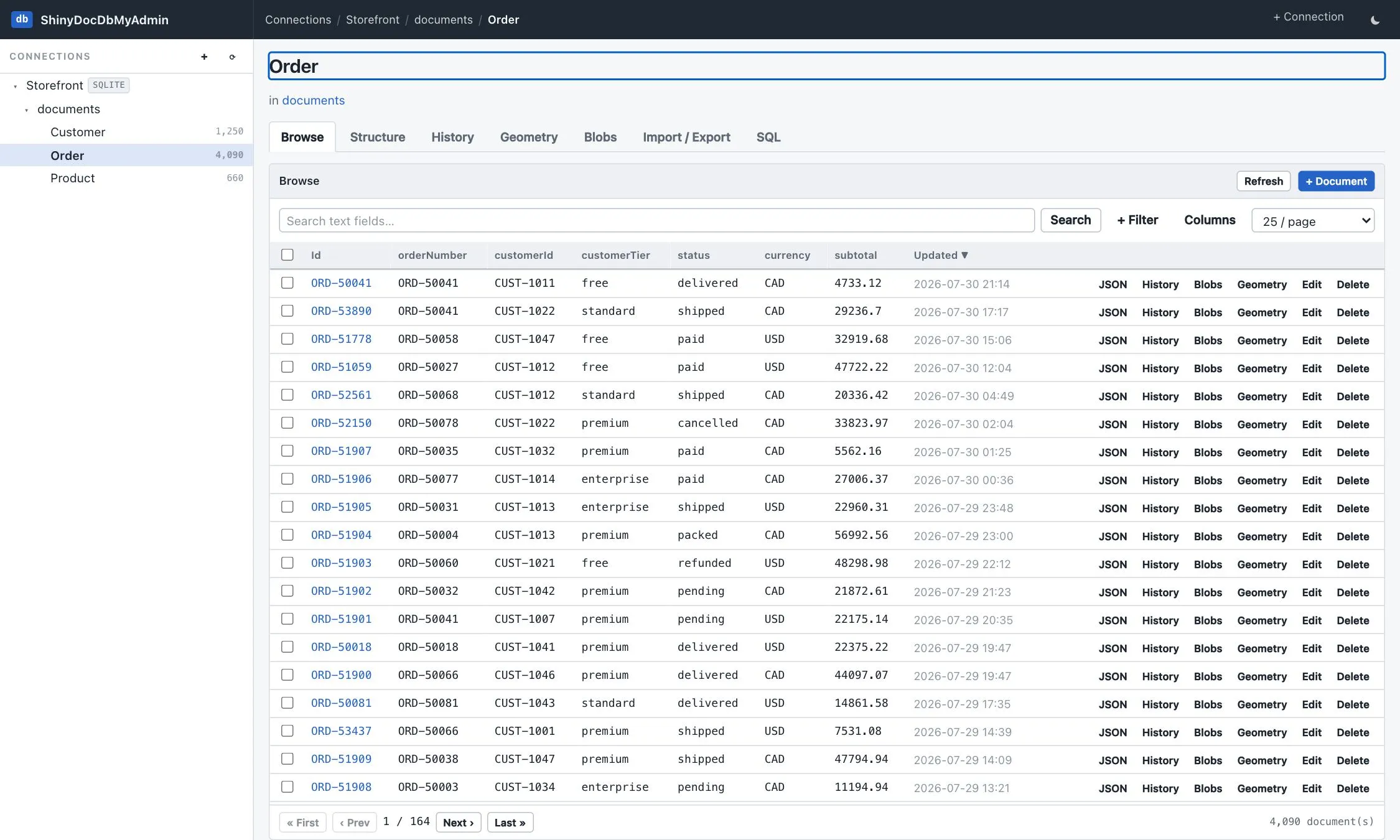
Section titled “See your data”ShinyDocDbMyAdmin is a phpMyAdmin-style front end for any DocumentDb store: browse and edit documents, run
queries and EXPLAIN, diff temporal versions, map geometry, inspect vectors, generate test data, and ask an AI
assistant about your data. It ships as a container image and as a terminal UI.
Admin UI · Terminal UI · Try the live demo