


Encrypted fields
Field-level encryption stores a value as a self-describing envelope inside the JSON body:
{ "id": "p1", "name": "Ada", "ssn": "enc:1:k1:AfLs8n/zgu1NxalYU+uH7J0..." }The admin tools are fluent in that envelope. They read it, describe it, report which keys a type’s documents are actually under, and refuse to quietly destroy one. What they never do is create one: writing an envelope needs the type’s mapping (which property, which mode) and the key ring, and getting either wrong produces a document the application cannot read.
All of that works with no key at all. Reading the values back is a separate, opt-in step — see Reading protected values at the bottom, and note that it is the smaller half.
The badge
Section titled “The badge”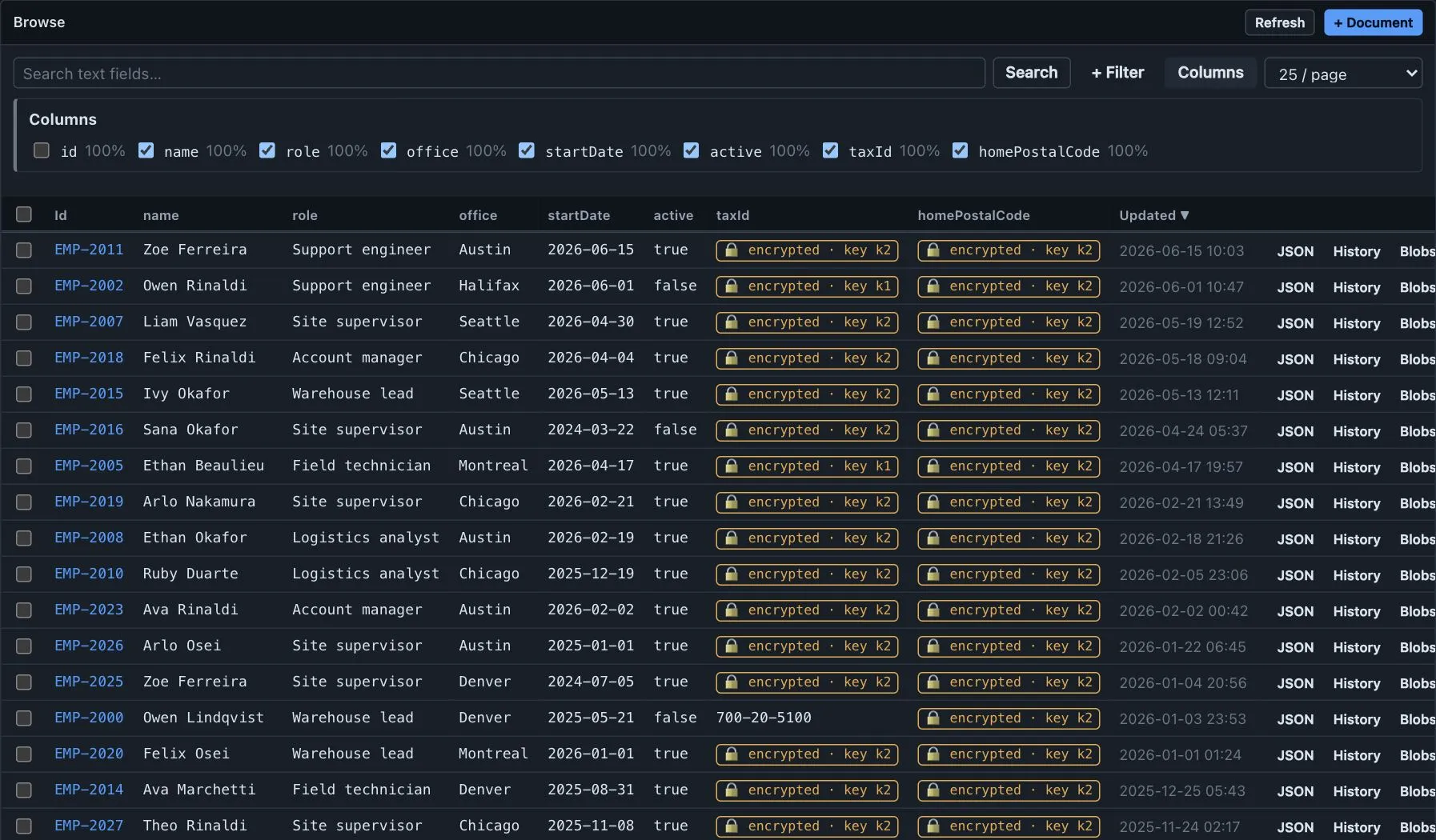
Anywhere a value would be shown, an envelope renders as what it is rather than as a wall of base64:
- Browse grid —
🔒 encrypted · key k1. Grids never decrypt, whatever keys the connection holds. - JSON view — a
🔒 encrypted (k1)chip with a show ciphertext toggle. The toggle is there because an operator sometimes genuinely needs the base64: pasting a deterministic ciphertext into the filter console is the only predicate that can match one, and comparing two rows by eye is the other reason. - Structure tab — the path’s type reads
encrypted, notstring. An envelope is a JSON string, but saying so describes the storage rather than the field.
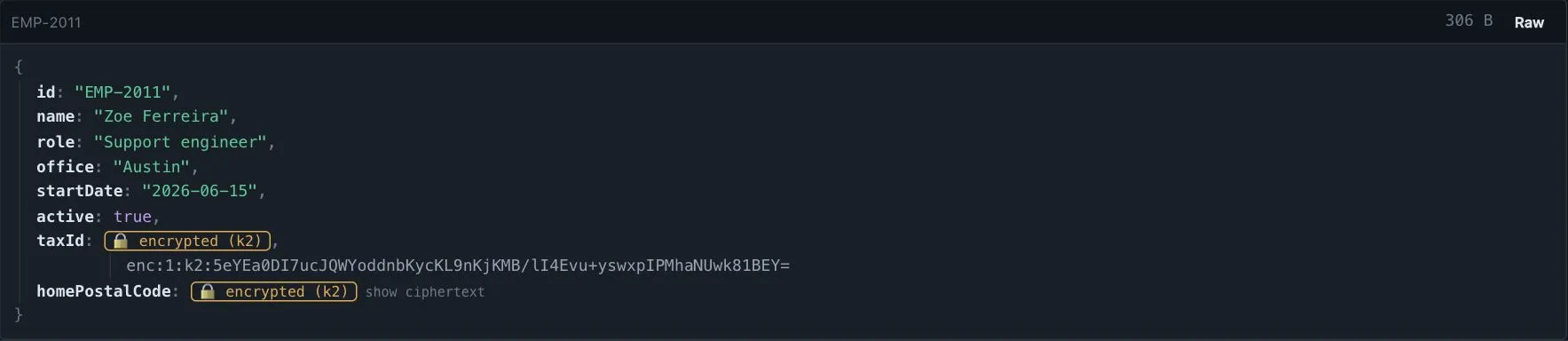
The terminal front end shows the same text without the emoji, styled as a dim cell.
Key coverage
Section titled “Key coverage”The Structure tab grows an Encryption card listing every protected path, the keys seen in the sample, and — on demand — the counts across the whole type.
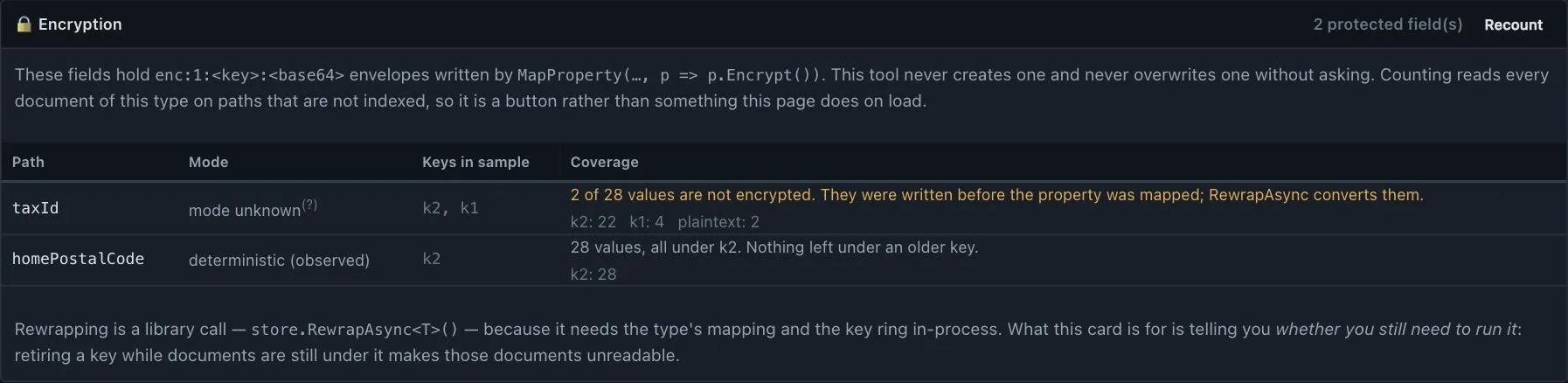
RewrapAsync<T>() moves documents onto a new key, but nothing tells you whether it finished, and
retiring a key while documents are still under it makes those documents unreadable. That is the question
this card exists to answer, and the one thing only the admin tool can:
ssn— 4,812 values, all underk2. Nothing left under an older key.
ssn— 620 of 4,812 still underk1. RunRewrapAsync<T>()before retiringk1.
RewrapAsyncconverts them.
notes— 12 values under a key not seen in the sample. Widen the sample or check the key ring.
Counting is a button, not something the tab does on load: it is one full scan per path, on a path that is rarely usefully indexed. The button says how many documents it will read.
The Other bucket is the remainder — total minus the known keys minus the plaintext — so it self-corrects.
A non-zero value means the 200-document sample never reached a key that is in use, which is itself worth
knowing.
Mode is reported only when the data proves it
Section titled “Mode is reported only when the data proves it”| What the card says | What it means |
|---|---|
deterministic (observed) |
A ciphertext repeated across the sample. Randomized mode draws a fresh nonce per write and can never repeat one, so a repeat is proof. |
mode unknown |
No repeat was seen. That proves nothing: a deterministic column of distinct values is indistinguishable from a randomized one. |
There is deliberately no “randomized”. It is unprovable from stored data, and a tool that claimed it would be wrong exactly when it mattered.
The downgrade guard
Section titled “The downgrade guard”The admin writes raw JSON bodies over ADO — it never goes through the library — so nothing encrypts on save. Editing an envelope into plaintext therefore does not break anything: the library’s converter reads a non-envelope as pre-encryption plaintext and hands it back as-is. The failure mode is a silent loss of protection, which is worse than an exception.
So the editor guards the operation:
-
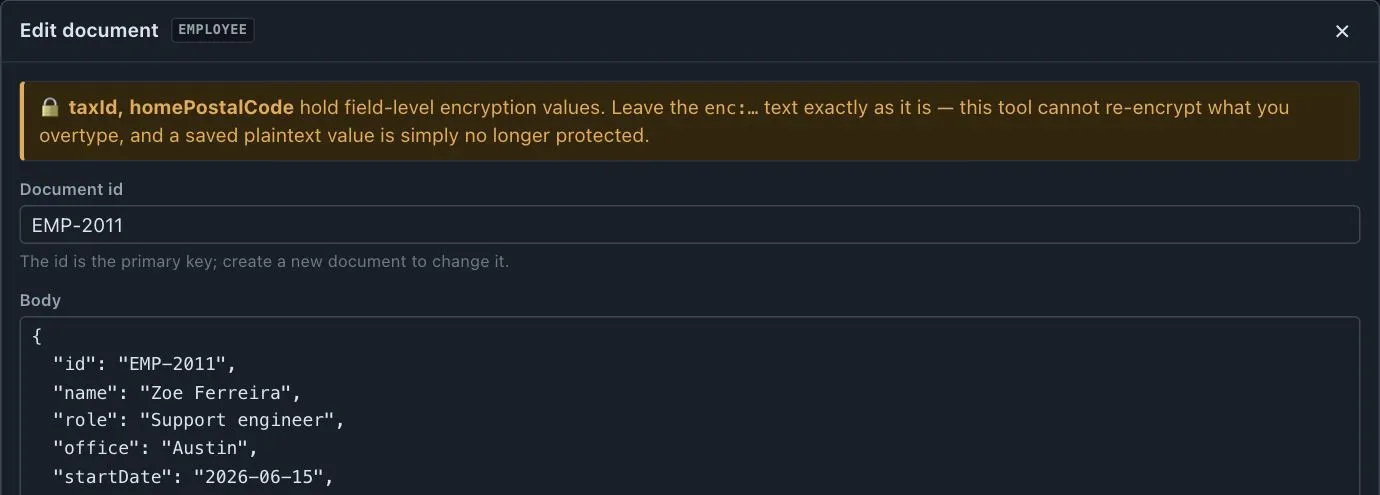
Before you start typing, a banner names the type’s encrypted paths.
-
On save, the submitted body is diffed against the stored one. A path that held an envelope and now holds clear text is a downgrade, and the save is refused with the paths named:
taxIdwould be saved in clear text. The application will read it back as plaintext and the value is no longer protected.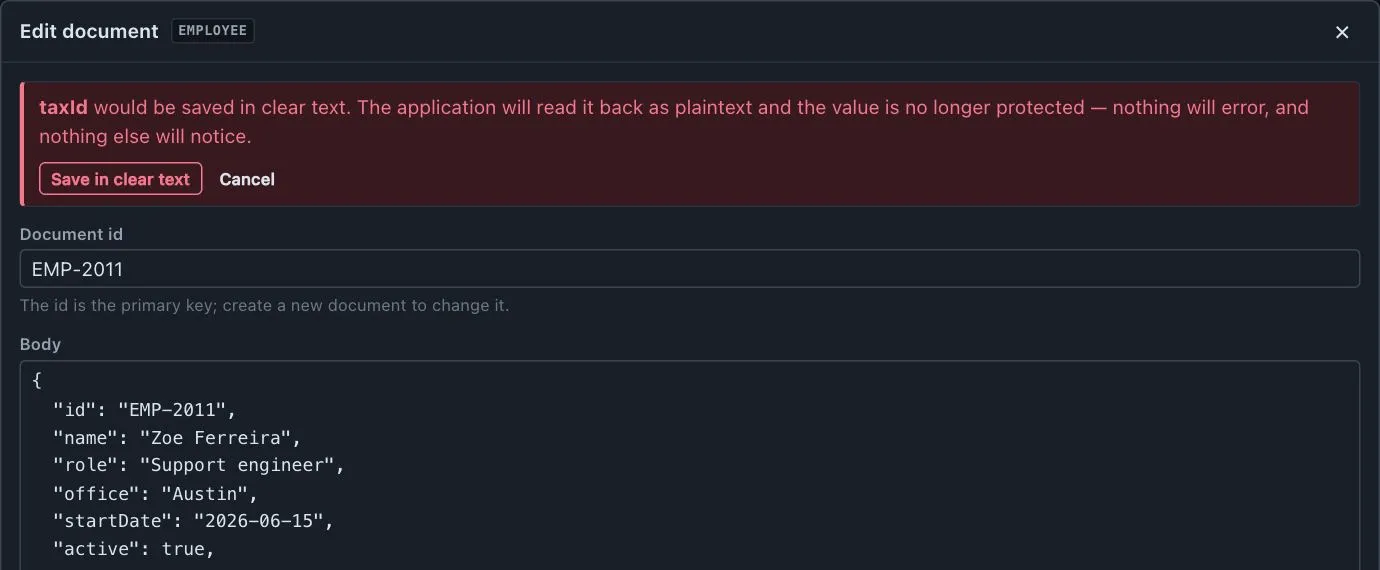
-
A second button — Save in clear text — proceeds anyway, because you may well have meant to. It is a decision, not an accident, and it is written to the log.
A byte-identical envelope is untouched and saves cleanly. Removing the field, or setting it to null,
deletes a value rather than exposing one and is an ordinary edit.
The same rule covers a new document, or a field that happened to be null in this one: plaintext written into a path every other document of the type protects is a downgrade too.
Import and export
Section titled “Import and export”An import that writes plaintext into a protected path is the same downgrade, but blocking a whole file over it would be the wrong response. It is counted and reported in the summary:
40 document(s) wrote clear text into an encrypted field. Those values are no longer protected — the application will read them back as plaintext.
An export is already correct: the envelope leaves exactly as stored. The export panel says so, because “export” reads as “a readable file” and for these fields it is not — the file carries ciphertext and is readable only with the application’s key ring. Export never decrypts, whatever keys the connection holds.
Query surfaces that cannot work
Section titled “Query surfaces that cannot work”Rather than offering a search that silently returns nothing, the tool takes the surface away or explains it:
-
Quick search excludes encrypted paths outright. A
LIKEover ciphertext is guaranteed noise, and a search that matches nothing reads as “there is no such document”. -
Default grid columns exclude them too — a locked column of
encrypted · key k1teaches nothing — but they stay selectable, because seeing which fields are protected is worth a column when that is what you came to check. -
The filter console warns inline, differently per mode, because the two fail differently:
ssnis encrypted; a predicate over it cannot match. The console compiles to SQL directly, so it does not encrypt your constant the way the library’s LINQ path does.emailis deterministically encrypted: only exact-ciphertext equality can match. Copy the ciphertext from a row. -
Creating an index on an encrypted path warns but never blocks. A deterministic path is legitimately indexable — that is the point of the mode — and the sample usually cannot prove which mode is in use, so refusing on a guess would stop the useful case to prevent a wasteful one.
The AI assistant never decrypts
Section titled “The AI assistant never decrypts”The assistant reads what is stored. Encrypted fields reach the model as the ciphertext they are, whatever keys a connection carries.
This is not a rule the model is asked to follow — there is no decrypting tool for it to call. A document body goes to a third-party model endpoint, and ciphertext arriving there is harmless where a decrypted SSN is a breach. It is not configurable.
Reading protected values
Section titled “Reading protected values”Optional, off by default, and per connection. A connection can carry a read-only key ring: pairs of key id and base64 AES-256 key material, stored beside the connection string under the same instance key and handled exactly like it.
The connection editor states the trade in one line:
These keys let this tool read protected values. They are stored beside the connection string and are only as safe as this installation.
That is a trade you might make on a staging database and would never make on production, which is why it is per connection rather than a global setting. Leave it empty and everything above still works.
With keys configured, the document view lists the protected paths, masked:
ssn ••••• [Reveal]The rules are enforced in code, not documented as etiquette:
- Masked by default, never auto-expanded. Only the document view offers a reveal; grids never decrypt.
- Never in demo mode. A public playground is the one place storing data keys is never worth it, and the refusal sits in the key ring as well as in the connection editor.
- Never in the AI lane, per above.
- Never in export. An export decides what leaves the building; it stays ciphertext.
- Never on a host-provided connection. Its secrets come from the AppHost and only ever live in memory — there is nowhere an operator could have typed a data key.
A failed reveal says which kind of failure it was, because they need different fixes:
| Report | Meaning |
|---|---|
encrypted under key k2, which is not on this connection |
Add that key, or restore from a backup taken before it was retired. |
would not authenticate under key k1 |
Either the stored value was altered, or the key configured under that id is not the one it was written with. AES-GCM cannot tell those apart. |
| a key on this connection is not usable | A configuration problem — a mistyped or wrong-length key — not a data problem. |
Every value renders without the tool knowing the property’s CLR type, because every one of the library’s
value codecs encodes as UTF-8 text. A string, an int, a Guid and a DateTime all come back readable.
What the tool will not do
Section titled “What the tool will not do”- Encrypt on write. It never creates an envelope.
- Rewrap. That is
store.RewrapAsync<T>(), which needs the mapping and the key ring in-process — adotnetone-liner is the right tool. What the admin does is tell you whether you still need to run it. - Manage keys. Nothing here generates, rotates or retires the application’s keys. The key ring above is for reading, and says so in those words.