


Kanban
KanbanView is a board: columns of cards you drag between. It covers the things that make a Kanban a
Kanban rather than a row of lists — WIP limits that are actually enforced, swimlanes, collapsible
columns, a cancellable move, and an add-card affordance that never invents a card of its own.


Screenshots
Section titled “Screenshots”MAUI (iOS)
| Board | Swimlanes |
|---|---|
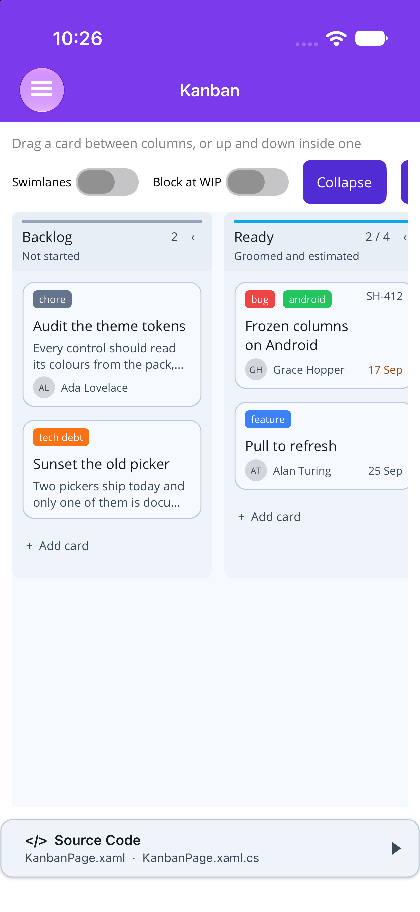 |
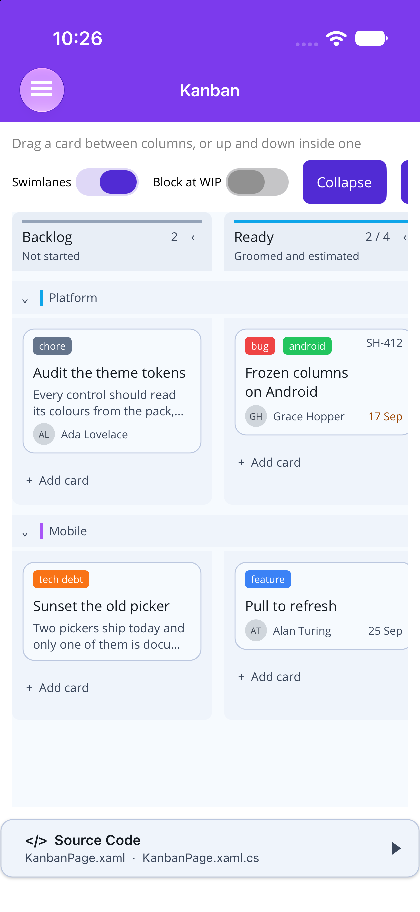 |
Blazor
| Sprint board | Swimlanes |
|---|---|
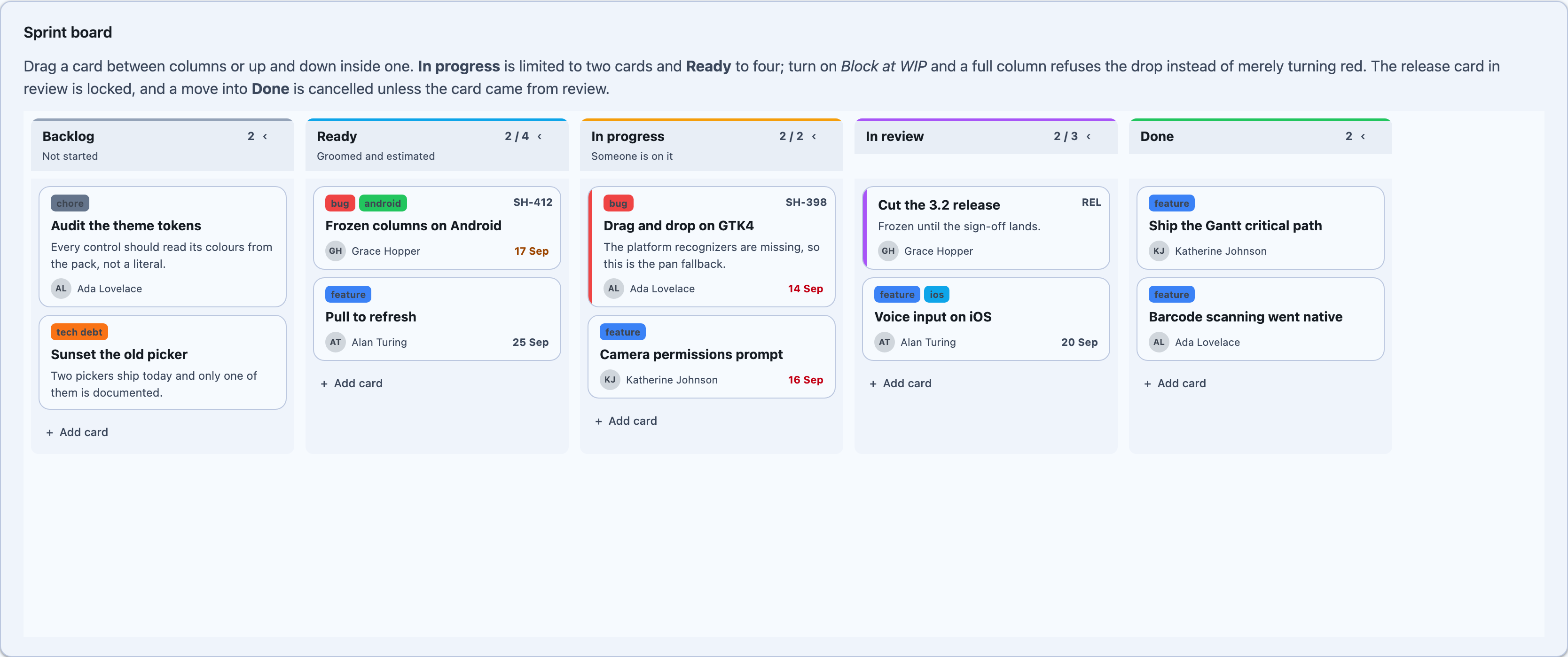 |
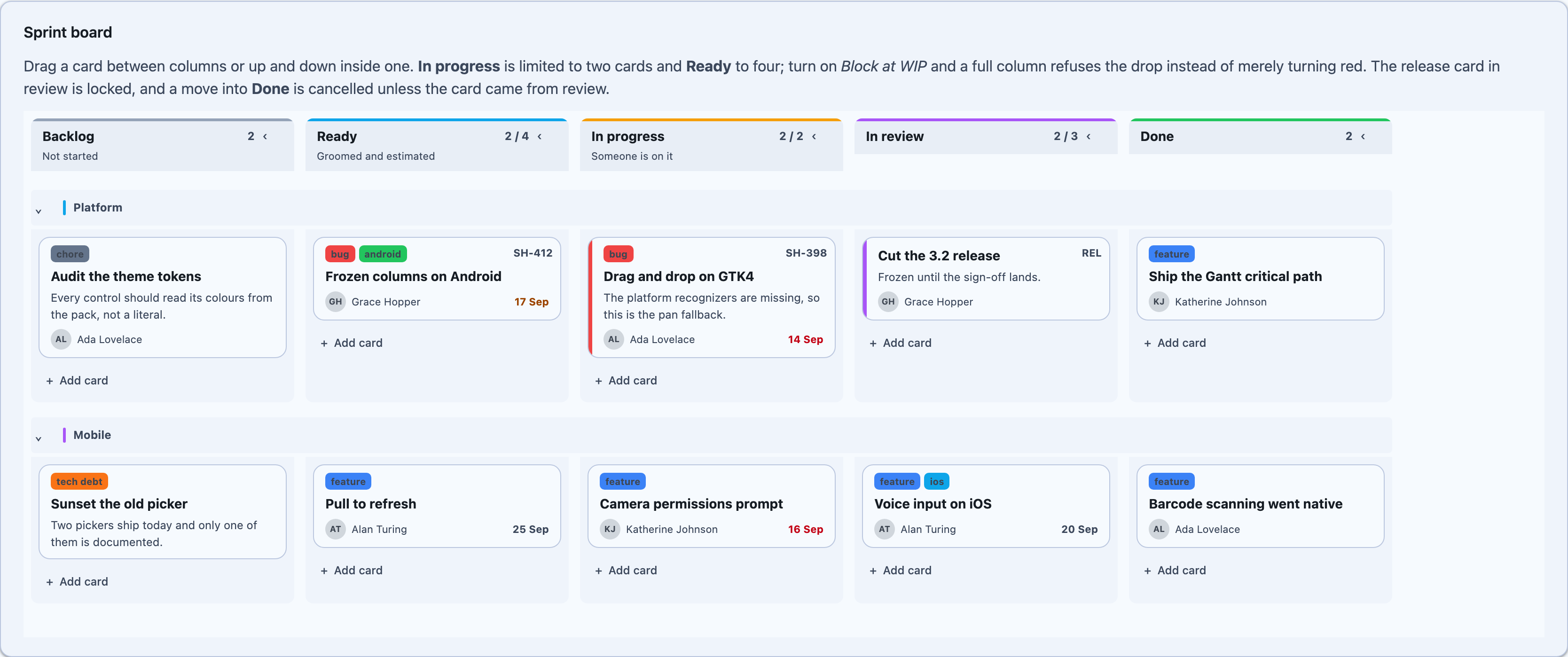 |
The one thing to understand first
Section titled “The one thing to understand first”Every decision a board makes lives in KanbanBoard, and neither control makes one of its own.
Which lane a card belongs to, whether a column is over its limit, whether a drop is allowed, where
exactly the card lands, and what that does to every other card’s order — all of it is plain
bookkeeping over the model, with no idea that a screen exists.
KanbanBoard.cs is one file, mirrored line for line into both packages, and a test in
Shiny.Blazor.Controls.Tests fails if the copies drift. That matters more here than it looks: a
drop that behaved one way on a phone and another way in a browser is a bug neither host’s own tests
would ever notice.
The model
Section titled “The model”using Shiny.Maui.Controls.Kanban; // or Shiny.Blazor.Controls.Kanban
var columns = new ObservableCollection<KanbanColumn>{ new() { Id = "todo", Title = "To do" }, new() { Id = "doing", Title = "In progress", WipLimit = 2, Color = "#F59E0B" }, new() { Id = "done", Title = "Done" }};
var cards = new ObservableCollection<KanbanCard>{ new() { Id = "1", ColumnId = "todo", Order = 0, Title = "Audit the theme tokens" }, new() { Id = "2", ColumnId = "doing", Order = 0, Title = "Drag and drop on GTK4", AssigneeName = "Ada Lovelace", DueDate = DateTimeOffset.Now.AddDays(1), Badge = "SH-398" }};
cards[1].Labels.Add(new KanbanLabel("bug", "#EF4444"));Cards must be KanbanCard — there is no generic TItem. Map your own type onto one and put the
original in KanbanCard.Item; every event and every template hands the card back. The reason is not
ceremony: a drop rewrites ColumnId, SwimlaneId and Order, and a board reflecting over an
arbitrary item type has nowhere to write them.
Color on a card, a column, a swimlane or a label is a string, not a platform colour — anything
the host parses (#2563eb, rebeccapurple). That is what lets the model files be identical on both
hosts.
WIP limits
Section titled “WIP limits”A column’s WipLimit counts the whole column, across every swimlane — a limit is a limit on work in
that state, not on work in that state on one row of the board.
Two independent switches decide what a limit does:
ShowWipLimits |
Whether an over-limit column is styled as over-limit — tinted header, count in the error colour |
WipBehavior |
Whether an over-limit column refuses the drop — None, Warn (default, lets it land), Block |
Reordering inside a column is always allowed however full it is. Sorting work already in progress adds none, and a full column that cannot be sorted reads as a board that has frozen.
A refused drop raises DropRejected with a KanbanDropRejection saying which of CardLocked,
ColumnRejectsDrop, ColumnRejectsDrag, WipLimitReached, UnknownColumn or UnknownSwimlane it
was. Handle it — a silently refused drag is the most common complaint about a Kanban board.
Swimlanes
Section titled “Swimlanes”Set SwimlaneMode="Grouped" and supply Swimlanes; each band carries the full set of columns, and
cards land in the lane named by KanbanCard.SwimlaneId. A card whose swimlane id matches nothing
falls into the first lane rather than disappearing. With SwimlaneMode="None" — the default —
SwimlaneId is ignored entirely.
A collapsed column is a narrow spine: the chevron sits on top with a compact count (3/4) stacked under it, and its lanes paint nothing while still accepting drops. Collapsing a band (or a column) is a display decision only: the cards still count against WIP limits
and the lane is still a drop target.
Moving a card
Section titled “Moving a card”Every move — dragged or called — goes through the same three steps:
KanbanBoard.Evaluatejudges the drop and gives a reason if it refuses.CardMovingfires with the whole plannedKanbanMove. SetCanceland nothing moves.KanbanBoard.Applyrewrites the card and renumbers both lanes from zero, thenCardMovedfires.
A KanbanMove records where the card came from — column, swimlane and index — as well as where it
went, which makes undo a stack of moves and nothing else.
void OnCardMoving(object? sender, KanbanCardMovingEventArgs e){ // Only cards that have been through review may reach Done. if (e.Move.ToColumnId == "done" && e.Move.FromColumnId != "review") e.Cancel = true;}Orders are renumbered, not wedged between two fractional neighbours. Fractions run out of precision after a few hundred drags into the same gap and start colliding, and the collision presents as cards swapping places on their own.
Adding a card
Section titled “Adding a card”AddCardMode puts a + Add card affordance at the foot of each column: Button raises the request
immediately, Inline opens a one-line composer first and raises it with the typed title.
The board never creates the card. It has no idea what a card means in your domain, and one that
invented a blank would leave you deleting it again on cancel. Handle AddCardRequested, add a
KanbanCard to your own collection, and it renders.
<shiny:KanbanView Cards="{Binding Cards}" Columns="{Binding Columns}" Swimlanes="{Binding Swimlanes}" SwimlaneMode="Grouped" WipBehavior="Block" ShowWipLimits="True" AddCardMode="Inline" ColumnWidth="260" SelectedCard="{Binding SelectedCard, Mode=TwoWay}" CardMoving="OnCardMoving" CardMoved="OnCardMoved" DropRejected="OnDropRejected" AddCardRequested="OnAddCardRequested" />Methods: MoveCard(card, columnId, swimlaneId, index), RebuildBoard(), ToggleColumn(column),
ToggleSwimlane(swimlane), CollapseAllColumns(), ExpandAllColumns(), ScrollToCard(card),
ScrollToColumn(column).
Events: CardMoving (cancellable), CardMoved, DropRejected, CardTapped,
ColumnCollapseChanged, AddCardRequested, BoardBuilt. Commands: CardTappedCommand,
CardMovedCommand, AddCardCommand.
The drag runs on a PanGestureRecognizer on every platform, not on DragGestureRecognizer. The
platform recognizers are broken on Mac Catalyst and missing entirely from the AppKit and GTK4 hosts,
and even where they work the event carries no pointer position — which on a board would mean knowing
a card was dropped on a column but not where in it.
Blazor
Section titled “Blazor”@using Shiny.Blazor.Controls.Kanban
<div style="height:560px"> <KanbanView @ref="board" Cards="cards" Columns="columns" Swimlanes="swimlanes" SwimlaneMode="KanbanSwimlaneMode.Grouped" WipBehavior="KanbanWipBehavior.Block" AddCardMode="KanbanAddCardMode.Inline" ColumnWidth="260" @bind-SelectedCard="selected" OnCardMoving="OnCardMoving" OnCardMoved="OnCardMoved" OnDropRejected="OnDropRejected" OnAddCardRequested="OnAddCardRequested" /></div>Methods: MoveCardAsync(card, columnId, swimlaneId, index), RebuildBoard(), ToggleColumn,
ToggleSwimlane, CollapseAllColumns(), ExpandAllColumns(), ScrollToCardAsync(card).
Callbacks: OnCardMoving, OnCardMoved, OnDropRejected, OnCardTapped,
OnColumnCollapseChanged, OnAddCardRequested, OnBoardBuilt.
The drag runs on pointer events, not HTML5 drag-and-drop, because DnD never fires on touch — and a board is the control people most expect to drag on a phone. Hit testing stays in JavaScript: it means reading element rectangles, and routing that through interop would put a render pass between the pointer moving and the insertion line following it. C# is consulted once, at drag start, for the set of lanes that will accept the card.
The column headers are a position: sticky row inside the same scroller as the lanes, so they follow
a horizontal scroll for free and pin on a vertical one.
The default card, and replacing it
Section titled “The default card, and replacing it”The built-in card draws an accent stripe, label chips, a badge, a title, a description clamped to
DescriptionLineLimit lines, and a footer with the assignee and the due date. The due date turns the
error colour once it is past and the warning colour inside DueSoonWindow.
All of it is switchable — ShowLabels, ShowAssignee, ShowDueDate, DescriptionLineLimit,
ColumnCountDisplay — so a board that wants less says so rather than reaching for CardTemplate.
The template is for a card that is genuinely a different shape: a photo, a chart, a burndown.
CardTemplate, ColumnHeaderTemplate, SwimlaneHeaderTemplate and EmptyColumnTemplate all take
the matching model as their binding context. The drag still belongs to the board, which wraps
whatever the template produces — a custom card neither needs nor gets its own gesture.
Layout
Section titled “Layout”ColumnWidth |
Width of one column. Default 280. A column’s own Width overrides it. |
CollapsedColumnWidth |
Width of a collapsed spine. Default 52. |
ColumnSpacing / CardSpacing |
Gaps between columns and between cards. Default 12 / 8. |
MinColumnHeight |
How tall an empty column stays. Default 120 — a well with no height is a drop target nobody can hit. |
IsReadOnly |
Nothing drags, collapses or adds. Wins over every other permission. |
Styling follows the theme pack on both hosts — SetDynamicResource against ShinyThemeKeys on
MAUI, var(--shiny-color-*) on Blazor. See Theming.