


Keyframe Animation
Declarative keyframe animation for .NET MAUI — the CSS @keyframes model expressed in XAML, plus a fluent C# timeline API, storyboards, a drawable scene graph, and an optional headless frame exporter.
The thing MAUI’s own Animation class cannot do is seek. Everything here is built around one design constraint: evaluating an animation is a pure function of time. Nothing reads the previous frame. That single property is what makes scrubbing, mid-flight reversal, byte-identical export, and non-flaky timing tests possible rather than merely approximable.


Screenshots
Section titled “Screenshots”| Animated views | The drawn scene and its scrubber |
|---|---|
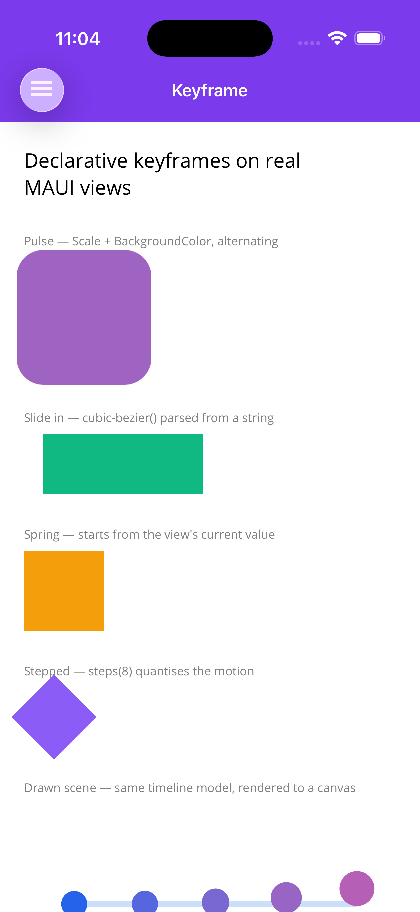 |
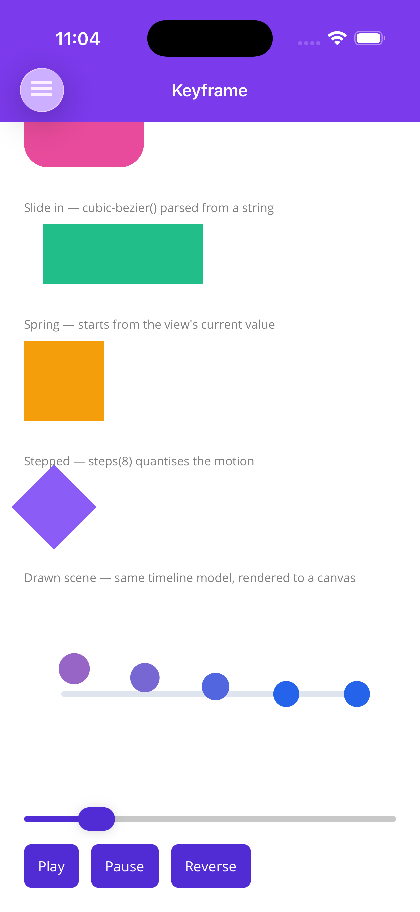 |
Packages
Section titled “Packages”| Package | What it is | Depends on |
|---|---|---|
Shiny.Controls.Keyframe.Shared |
The host-neutral timing engine and scene graph — Timing, Timeline, Storyboard, Track<T>, IInterpolator<T>, Player, the easing curves, KeyframeScene and its layers. |
Microsoft.Maui.Graphics |
Shiny.Maui.Controls.Keyframe |
The XAML surface (Animate.Keyframes, Keyframes / Track / Key), KeyframeView, MauiClock, and the animatable-property registry. |
the above + Microsoft.Maui.Controls |
Shiny.Maui.Controls.Keyframe.Export |
Headless frame export and a pure-managed GIF encoder. Optional — and the only thing in Keyframe that pulls in SkiaSharp. | the shared package + Microsoft.Maui.Graphics.Skia |
Install only what you need. Animating views never requires the export package.
Features
Section titled “Features”- CSS
@keyframessemantics in XAML —Duration,Delay,Iterations,Direction,Fill, and per-key easing behave the way the web spec says they do, includingFill="Both"andDirection="Alternate". - Seekable, reversible playback —
SeekProgress(0.35)scrubs,Rate = -1reverses from wherever the animation currently sits. No rebuilding, no restart. - CSS easing function syntax —
cubic-bezier(0.34, 1.56, 0.64, 1),steps(8), andspring(0.35, 14)parse from a plain string, so a curve copied out of a design tool or browser devtools pastes in verbatim. 38 named curves too. - Implicit keyframes — omit
Valueon a key and it resolves to the target’s live value when playback starts, so a re-triggered animation continues from where it is instead of snapping. - Oklab colour blending by default — sRGB interpolation dips through grey at the midpoint; Oklab doesn’t.
ColorInterpolator.Srgband.LinearRgbremain available. - Shortest-arc angles —
Rotationfrom 350° to 10° turns forward 20°, not back 340°.Spinis there for when multiple turns are the point. - Fluent C# timelines and storyboards —
TimelineBuildercomposes tracks;Storyboardsequences, overlaps and staggers whole timelines on a shared clock, and nests. - A drawn scene graph —
KeyframeScene+KeyframeViewrun the same timing model against layers on a canvas (the Lottie-shaped lane) rather than views in the visual tree. - Deterministic offscreen export — sample a scene at exact frame times, lazily, and encode to GIF with no external dependency.
- AOT and trim safe — the property registry is hand-registered delegates, not reflection and not compiled
Expressiontrees, both of which work in the emulator and break on device under Native AOT. - Weak targets — an infinite animation on a popped page goes inert and is collected, rather than pinning the visual tree.
AI Skill
Section titled “AI Skill”Step 1 — Add the marketplace:
claude plugin marketplace add shinyorg/skillsStep 2 — Install the plugin:
claude plugin install shiny@shinyOne plugin installs all 37 Shiny skills. Your agent loads only the skill relevant to what you're building, so there's no cost to having them all available.
Step 1 — Add the marketplace:
copilot plugin marketplace add https://github.com/shinyorg/skillsStep 2 — Install the plugin:
copilot plugin install shiny@shinyOne plugin installs all 37 Shiny skills. Your agent loads only the skill relevant to what you're building, so there's no cost to having them all available.
Installation
Section titled “Installation”dotnet add package Shiny.Maui.Controls.Keyframexmlns:kf="http://shiny.net/maui/keyframe"No builder.Use…() call is needed — there is nothing to register. That one XAML namespace covers the shared timing types as well.
Quick Start
Section titled “Quick Start”An attached property on any VisualElement:
<Border>    <kf:Animate.Keyframes>        <kf:Keyframes Duration="0:0:1.2" Iterations="Infinite" Direction="Alternate" Fill="Both">
            <kf:Track Property="Scale">                <kf:Key Offset="0"   Value="1" />                <kf:Key Offset="0.5" Value="1.15" Easing="CubicOut" />                <kf:Key Offset="1"   Value="1" />            </kf:Track>
            <kf:Track Property="BackgroundColor">                <kf:Key Offset="0" Value="#2563EB" />                <kf:Key Offset="1" Value="#EC4899" />            </kf:Track>
        </kf:Keyframes>    </kf:Animate.Keyframes></Border>
The same animation in C#:
using Shiny.Controls.Keyframe;using Shiny.Maui.Controls.Keyframe;
var timeline = TimelineBuilder    .Create(TimeSpan.FromSeconds(1.2))    .PingPong()    .RepeatForever()    .Fill(FillMode.Both)    .Animate(box, (v, x) => v.Scale = x, k => k        .From(1)        .Key(0.5, 1.15, Easings.CubicOut)        .To(1))    .Build();
var player = box.Play(timeline);
Why evaluation is a pure function of time
Section titled “Why evaluation is a pure function of time”IAnimationNode.Evaluate(t) computes the state at t from the keyframes alone. It never looks at the previous frame, and it never accumulates. Write code that leans on this rather than working around it:
| You want to… | Do this | Not this |
|---|---|---|
Scrub from a Slider or gesture |
player.SeekProgress(x), or bind KeyframeView.Progress two-way |
Rebuild a timeline at the new position |
| Reverse mid-flight | player.Rate = -1 (or a negative Speed) |
Build a second, reversed timeline |
| Export frames | Sample at exact frame times — identical bytes every run | Render off a real-time clock and hope |
| Test timing | Step a ManualClock |
Task.Delay and a tolerance |
Where to go next
Section titled “Where to go next”Limits worth knowing up front
Section titled “Limits worth knowing up front”- Everything ticks in managed code on the UI thread. Transform and opacity tracks map 1:1 onto
CAKeyframeAnimation/ObjectAnimator/ScalarKeyFrameAnimation, so native compositor offload is the design’s biggest remaining performance win — but it isn’t implemented yet. - Layout-affecting properties cost a measure/arrange every frame.
WidthRequest,HeightRequest,Margin, andPaddingall work and are flagged byAnimatableProperty.InvalidatesLayout, but prefer transform and opacity where you have the choice. - There is no Lottie parser.
KeyframeSceneis the scene graph one would need, but nothing reads a Lottie JSON file today. - MP4/video export is out of scope — that needs a real codec. Pipe
FrameExporter.Frames()to ffmpeg’s stdin instead. APNG and WebP aren’t implemented either.