


AI assistant
A chat that answers questions about your data by composing the same reads the rest of this tool performs — “how many zones are there, and which courier has the most drops?” instead of clicking through Browse, Structure and the filter console yourself.
Configured per connection, so you can point a development database at OpenAI and leave production on a local model, or off entirely. Set it up from Set up assistant on the connection overview; once configured, the conversation is available as an Assistant tab beside Browse (scoped to the type you’re looking at) and as a connection-level page for cross-table questions.
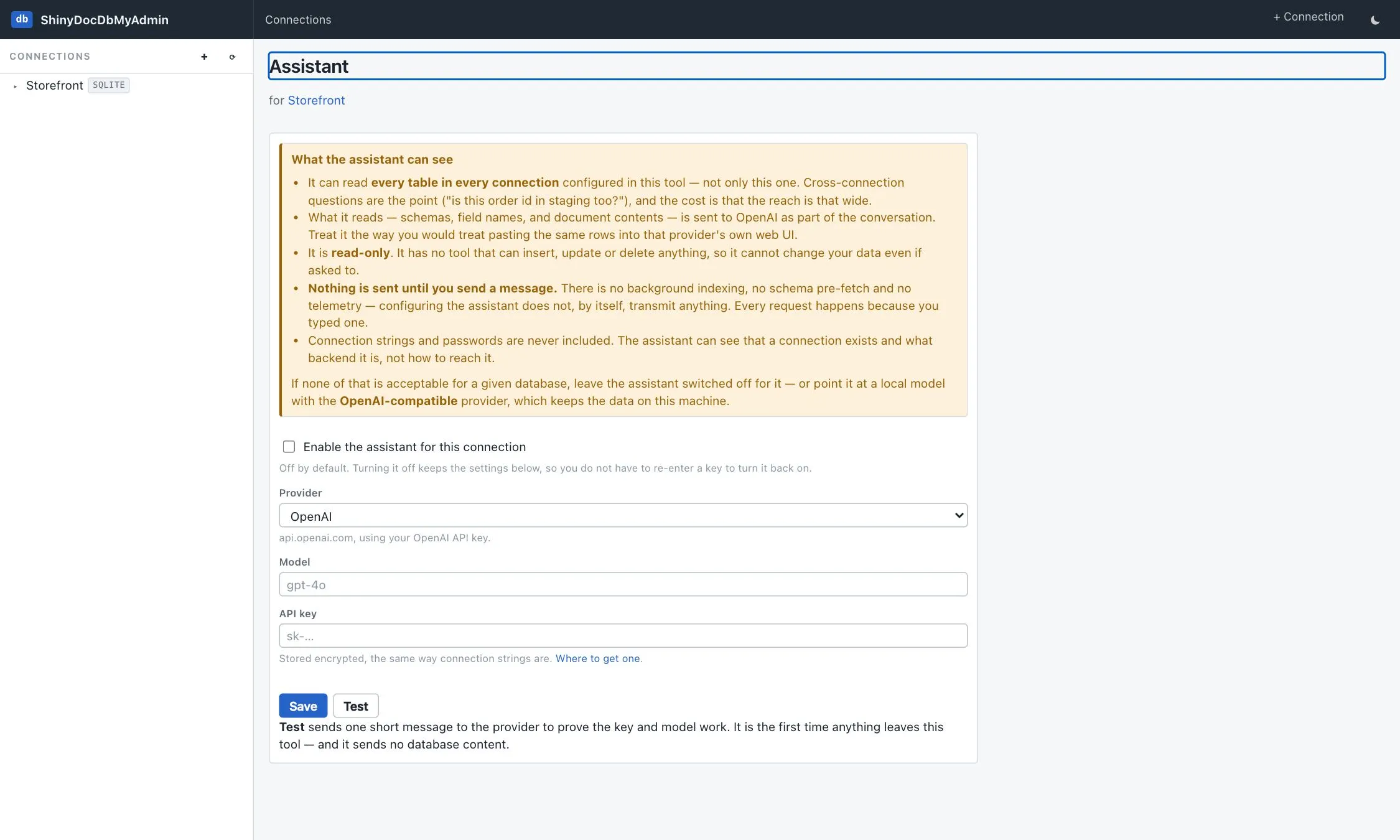
What it can see
Section titled “What it can see”This is the part worth reading before you enable it.
- It can read every table in every connection configured in this tool — not only the one you opened the chat from. Cross-connection questions are the point, and that reach is the cost.
- What it reads — schemas, field names and document contents — is sent to the provider you configured, as part of the conversation. Treat it the way you’d treat pasting the same rows into that provider’s own web UI.
- Nothing is sent until you send a message. There’s no background indexing, no schema pre-fetch and no telemetry. Configuring the assistant does not, by itself, transmit anything; every request happens because you typed one. The Test button on the settings page is the one deliberate exception — it sends a fixed one-word prompt to prove the key works, and no database content.
- Connection strings and passwords are never included. The assistant can see that a connection exists and what backend it is, not how to reach it.
The same disclosure is on the settings page itself, so nobody has to have read this to have seen it.
It only writes when you tell it to
Section titled “It only writes when you tell it to”The assistant is given ten read tools by default: list_connections, list_tables, list_types,
describe_type, table_stats, browse_documents, get_document, list_indexes, search_full_text
and outbox_status. Every one is a read.
There is no raw SQL tool — so on the default surface, read-only is a property of the tool surface rather than an instruction in a prompt the model might be talked out of. A test pins that exact read-only list, so a write tool cannot be added to the read path by accident.
Writes are opt-in
Section titled “Writes are opt-in”Three tools — insert_document, update_document and delete_document — can be enabled per
connection on the Assistant settings page. They are off by default and every one is a deliberate
tick:
insert_documentcreates a new document. It refuses when the id already exists.update_documentreplaces the body of an existing document. It refuses when the id does not exist.delete_documentremoves one document by id — one per call, on purpose. A bulk delete is a decision worth being explicit about.
Writes are scoped to the connection the assistant conversation was opened against. A chat opened
against staging cannot call update_document for production even if it knows the id; the tool
refuses. And the underlying connection profile’s Read-only flag still refuses writes regardless,
so a read-only profile stays read-only whatever the assistant is allowed.
Leave every box unticked to keep the classic read-only surface. Ask a read-only assistant to delete something and it will tell you it has no way to, and point you at the Browse and Edit tabs, which do.
Results are capped per call (50 rows, 4 KB of JSON per document) and truncation is reported to the model, so it reports a total from the count rather than from the rows it happened to receive.
Each reply lists the tools that ran, so what was read is visible per message rather than a claim made once at setup. The transcript lives in memory for the life of the browser session and is never written to disk — a file of production data sitting in the tool’s own store is a worse problem than losing history on refresh.
Providers
Section titled “Providers”| Provider | Notes |
|---|---|
| OpenAI | api.openai.com with your API key. |
| Azure OpenAI | Your own resource, so traffic stays in your tenant. The model box is the deployment name you chose in Azure, not the published model id. |
| Anthropic | Anthropic’s official .NET library (the Anthropic package). |
| OpenAI-compatible | Anything speaking the OpenAI wire format at a base URL you supply — OpenRouter, Groq, Gemini’s compatibility endpoint, LM Studio, vLLM, Ollama. |
The last one is also the privacy answer: point it at http://localhost:11434/v1 and a local model answers
your questions with nothing leaving the machine.
API keys are stored encrypted, the same way connection strings are — see the secret key.
Configuring it from the host
Section titled “Configuring it from the host”Everything above assumes someone types the configuration into the settings page. It can also arrive from outside — an Aspire AppHost, the terminal tool’s command line, or plain environment variables — so a developer opening the tool gets a working assistant without pasting their own API key into a database browser.
// AppHostbuilder.AddDocumentDbAdmin() .WithReference(store) .WithAi(AdminAiProvider.Anthropic, "claude-sonnet-4-5-20250929", builder.AddParameter("anthropic-key", secret: true));# terminal tool — the key comes from the environment, never a flagexport ShinyDocDbMyAdmin__Ai__ApiKey=sk-ant-...shinydocdb --profile catalog --ai-provider anthropic --ai-model claude-sonnet-4-5-20250929Host-supplied configuration is read-only in the tool. The settings page shows the values with a note saying where they came from and offers a Test button and nothing else — the same treatment a host-provided connection gets. The host stays the single source of truth, and nobody can quietly repoint a shared instance at a different key.
The underlying configuration is one section, which both front ends read:
| Key | Notes |
|---|---|
ShinyDocDbMyAdmin:Ai:Provider |
OpenAI, AzureOpenAI, Anthropic or OpenAiCompatible. azure, compatible and ollama are accepted as aliases. |
ShinyDocDbMyAdmin:Ai:Model |
Model id, or the deployment name on Azure. Required alongside Provider — half a configuration is ignored with a warning. |
ShinyDocDbMyAdmin:Ai:ApiKey |
Plaintext in, encrypted at rest like any other key. |
ShinyDocDbMyAdmin:Ai:Endpoint |
Required for Azure and OpenAI-compatible. |
ShinyDocDbMyAdmin:Ai:Enabled |
Defaults to true. False stages a key without switching the assistant on. |
ShinyDocDbMyAdmin:Ai:AllowInsert / AllowUpdate / AllowDelete |
Off unless set. See writes are opt-in. |
Shiny:DocumentDb:<store>:Ai:* overrides any of those for one host-provided store, layered key by
key — so pointing one database at a bigger model doesn’t mean restating the API key. From an AppHost
that’s .WithAiFor(store, …), and .WithAiWrites(insert: true, store: store) for the grants.
DisableAi wins over all of it: a host that removed the assistant has nothing to configure, and the keys
are not read at all.
Turning it off entirely
Section titled “Turning it off entirely”For a public instance — where a visible “configure AI” box invites a stranger to paste their own API key
into a database browser they don’t control — set ShinyDocDbMyAdmin:DisableAi. The feature is then
absent, not merely hidden: no tab, no settings link, the AI services aren’t registered at all, and the
/ai/... and /assistant/... routes refuse to render rather than being merely unlinked.
From an Aspire AppHost, .WithoutAi() does the same thing.
Demo mode forces it on.
For the library’s own AI story — MCP tools over your store from your application — see AI tools.