


AddressEntry
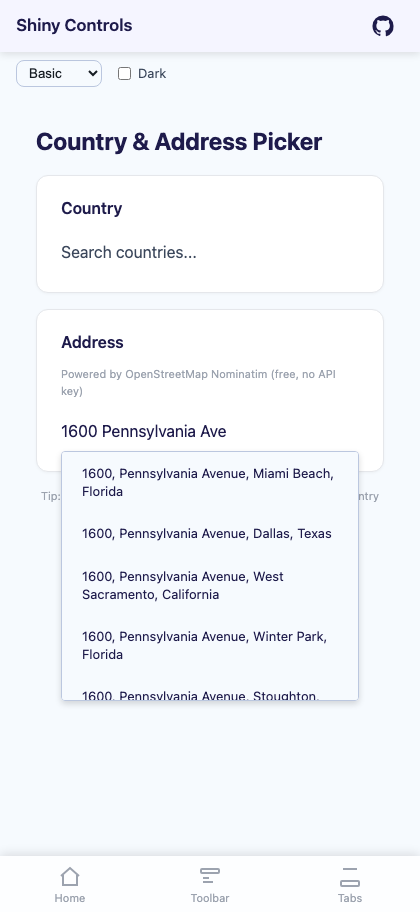
An address search control built on AutoCompleteEntry that queries a geocoding provider (Nominatim/OpenStreetMap by default) and returns structured address data with coordinates. Supports custom geocoding providers via IAddressSearchProvider.


MAUI
Blazor
Basic Usage
Section titled “Basic Usage”<shiny:AddressEntry SelectedAddress="{Binding Address}" Placeholder="Search address..." CountryCodes="us,ca" />The control debounces input (400ms, 3-character threshold), queries the geocoding provider, and displays matching addresses in a dropdown.
Properties
Section titled “Properties”| Property | Type | Default | Description |
|---|---|---|---|
SelectedAddress |
Address? |
null |
Selected address (TwoWay) |
SearchProvider |
IAddressSearchProvider? |
null |
Custom geocoding provider (defaults to Nominatim) |
CountryCodes |
string? |
null |
Comma-separated ISO country codes to filter results |
Placeholder |
string |
"Search address..." |
Placeholder text |
MaxDropDownHeight |
double |
250 |
Maximum dropdown height |
TextColor |
Color? / string? |
null |
Text color |
PlaceholderColor |
Color? / string? |
null |
Placeholder color |
DropDownBackgroundColor |
Color? / string? |
null |
Dropdown background |
DropDownBorderColor |
Color? / string? |
null |
Dropdown border color |
SpinnerColor |
Color? / string? |
null |
Loading spinner color |
FontSize |
double |
14 |
Font size |
FontFamily |
string? |
null |
Font family (MAUI only) |
CornerRadius |
double |
4 |
Dropdown corner radius (MAUI only) |
Events
Section titled “Events”| Event | Args | Description |
|---|---|---|
AddressSelected |
Address |
Fires when an address is selected |
Address Model
Section titled “Address Model”The Address record provides structured address data:
| Property | Type | Description |
|---|---|---|
DisplayName |
string |
Full formatted address |
HouseNumber |
string? |
House/building number |
Street |
string? |
Street name |
City |
string? |
City, town, or village |
State |
string? |
State or province |
PostalCode |
string? |
Postal/ZIP code |
Country |
string? |
Country name |
CountryCode |
string? |
ISO country code |
Latitude |
double |
Latitude coordinate |
Longitude |
double |
Longitude coordinate |
Custom Search Provider
Section titled “Custom Search Provider”Implement IAddressSearchProvider to use your own geocoding service:
public interface IAddressSearchProvider{ Task<IList<Address>> SearchAsync(string query, string? countryCodes, CancellationToken ct);}Example with a custom provider:
public class GoogleGeoProvider : IAddressSearchProvider{    readonly HttpClient http;
    public GoogleGeoProvider(HttpClient http) => this.http = http;
    public async Task<IList<Address>> SearchAsync(string query, string? countryCodes, CancellationToken ct)    {        // Call Google Geocoding API        var response = await http.GetFromJsonAsync<GoogleResult>($"...", ct);
return response.Results.Select(r => new Address( r.FormattedAddress, r.AddressComponents.HouseNumber, r.AddressComponents.Street, r.AddressComponents.City, r.AddressComponents.State, r.AddressComponents.PostalCode, r.AddressComponents.Country, r.AddressComponents.CountryCode, r.Geometry.Location.Lat, r.Geometry.Location.Lng )).ToList(); }}<shiny:AddressEntry SearchProvider="{Binding MyGeoProvider}" SelectedAddress="{Binding Address}" />Styling
Section titled “Styling”<shiny:AddressEntry SelectedAddress="{Binding Address}" FontSize="16" TextColor="Black" DropDownBackgroundColor="#F9FAFB" DropDownBorderColor="#6B7280" CornerRadius="8" />Blazor Usage
Section titled “Blazor Usage”<AddressEntry SelectedAddress="@selectedAddress" SelectedAddressChanged="OnAddressChanged" Placeholder="Search address..." CountryCodes="us,ca" FontSize="16" TextColor="#333" InputClass="my-input" DropDownClass="my-dropdown" />
@code { Address? selectedAddress;
void OnAddressChanged(Address? address) { selectedAddress = address; if (address is not null) { Console.WriteLine($"Lat: {address.Latitude}, Lng: {address.Longitude}"); } }}Blazor-Only Properties
Section titled “Blazor-Only Properties”| Property | Type | Default | Description |
|---|---|---|---|
InputClass |
string? |
null |
CSS class for the input element |
DropDownClass |
string? |
null |
CSS class for the dropdown |
Default Provider Notes
Section titled “Default Provider Notes”The built-in NominatimAddressSearchProvider queries OpenStreetMap’s free Nominatim API:
- Includes a
User-Agent: Shiny.Maui.Controls/1.0header (required by Nominatim usage policy) - Returns up to 5 results per query
- Supports country code filtering via the
CountryCodesparameter - For production use with high traffic, consider implementing a custom provider with a commercial geocoding service
AI Skill
Section titled “AI Skill”Step 1 — Add the marketplace:
claude plugin marketplace add shinyorg/skillsStep 2 — Install the plugin:
claude plugin install shiny@shinyOne plugin installs all 48 Shiny skills. Your agent loads only the skill relevant to what you're building, so there's no cost to having them all available.
Step 1 — Add the marketplace:
copilot plugin marketplace add https://github.com/shinyorg/skillsStep 2 — Install the plugin:
copilot plugin install shiny@shinyOne plugin installs all 48 Shiny skills. Your agent loads only the skill relevant to what you're building, so there's no cost to having them all available.