


Hosting
The bridge server
Section titled “The bridge server”The bridges live on your app’s own Shiny.Net.HttpServer. http.AddAppDeviceBridge(bridge => …) puts them on it, on
the same ShinyHttpServerBuilder you configure the server with — address, port, TLS, limits, authentication, endpoints
of your own. The delegate gets an AppDeviceBridgeBuilder: Configure for the options below, AddBridge<T>() for a
bridge of your own, and one extension per bridge package. UseAppDeviceBridge (from Shiny.AppDeviceBridge.Maui) does
that for a MAUI app: it hands out a MauiAppDeviceBridgeBuilder (the bridges that need MAUI extend it; the rest take
either builder), calls UseShiny(), supplies the app’s dispatcher as IWebAppMainThread, starts the server with the
app and restarts it on resume. The web app overload, UseAppDeviceBridge(bridge => …, webApp => …), does the same:
builder.UseAppDeviceBridge(bridge => bridge.Configure(o => o.AppId = "field-app"));
// The same server, configured wherever suits — before UseAppDeviceBridge or after.builder.Services.AddShinyHttpServer(http =>{    http.Options.Limits.MaxRequestBodySize = 64 * 1024 * 1024;    http.AddResponseCompression();}, autoStart: false);
Without MAUI — a headless device, a test — it’s the builder alone:
services.AddShinyHttpServer(http => http.AddAppDeviceBridge(bridge => bridge .Configure(o => o.AppId = "greenhouse") .AddRpiCameraBridge()));| Option | Default | Why |
|---|---|---|
AppId |
required | Names the data directory, namespaces settings, and is what a release server knows the app by. |
AllowPortFallback |
true |
If the port is taken when the bridge server starts the server, serve on a random one, with empty web storage for that launch. |
BasePath |
/ |
Serve the web app and the bridges under a path — /kiosk/, /kiosk/_bridge/…. See Mount points. |
BridgePrefix |
/_bridge |
Move the bridges when the web app wants that route for itself. |
AllowedHosts |
none | Host names accepted besides loopback names and IP addresses. See Security. |
AllowAnyCallerInDebug |
true |
A debug build lets any caller not arriving through a tunnel reach the bridges. See Who may call the bridges. |
AuthorizeBridges |
device only | Replace who may call the bridges. |
MaxFileWriteBytes |
256 MB | The largest file a bridge takes in one request. The server’s request body limit is raised to at least this. |
- The port.
UseAppDeviceBridgelistens on loopback port5780unless you give the server a port of your own. The port is fixed on purpose: localStorage, IndexedDB and cookies belong to the origin, and the port is part of the origin. - The bridges guard only what they mount. Your middleware, endpoints, authentication and fallback policy stay yours, and a request for anything the bridge server didn’t mount passes straight through to them.
- The bridge policy doesn’t depend on your pipeline. The bridges authenticate and authorize their own requests,
so they’re protected whether or not — and wherever — you call
UseAuthenticationandUseAuthorization. Your own endpoints need those calls; the bridges don’t. - The server doesn’t need a WebView. Without
Shiny.AppDeviceBridge.WebView, the bridges answer callers on the device (or anyoneAuthorizeBridgesallows), and a native call no page takes is reported as not handled.
The web app host
Section titled “The web app host”UseAppDeviceBridge(bridge => …, webApp => …) (from Shiny.AppDeviceBridge.WebView) serves a web app from that server
and shows it in WebAppHostView. One delegate registers the bridges alone; a second configures the web app. Its options:
| Option | Default | Why |
|---|---|---|
UseBaseline(...) |
The zip compiled into the app, served offline on first launch. | |
UpdateProvider |
none | Where releases come from: the release server, GitHub releases, or your own. See Updates. |
CheckTimeout |
5 s | After this, the installed version is shown anyway. |
BlockOnRequiredUpdateFailure |
false |
By default, a required download that fails midway is treated as offline. |
ApplyOptionalUpdatesImmediately |
false |
Swap to an optional update and reload as soon as it lands. |
DevServer |
none | Take pages from dotnet watch in development. See below. |
ServeWebAppRemotely |
false |
Serve the pages to other machines too, when the server is bound past loopback. |
ServeWebAppLocally |
false |
Serve the pages to any caller on this device — a browser opening the loopback address — not only the WebView. |
OnPrepareResponse |
none | Headers for each file of the web app, after the host’s own: a cache policy for the network, a security header. |
ContentTypeOverrides |
empty | Content types by extension (.bcmap, .pfb, …) for files the built-in map doesn’t know. |
Variants(...), SelectVariant |
none | Several builds in one package at the same URLs, chosen per request. See Client variants. |
BackgroundScript |
background.js |
What takes native calls with no page open. |
Mount points
Section titled “Mount points”The app is served at / and the bridges at /_bridge. Both move:
builder.UseAppDeviceBridge(bridge => bridge.Configure(o =>{ o.BasePath = "/kiosk"; // http://127.0.0.1:5780/kiosk/ o.BridgePrefix = "/_native"; // http://127.0.0.1:5780/kiosk/_native/app/info}));_hostdoesn’t move.{base}/_host/start,/pingand/configstay directly underBasePath, becauseGET {base}/_host/configis how a page finds out where everything else is.BridgePrefixcan’t be/_hostor sit under it.<base href>is rewritten for you. A Blazor publish ships<base href="/" />, which would send every asset request to the origin root. The WebView host rewrites it — in the entry document and in whatever the SPA fallback serves — to matchBasePath, inserting the tag if the document has none. You don’t need to republish with--base-href.- The page discovers the prefix, it isn’t told it.
Shiny.AppDeviceBridge.Blazorand the injectedinvoke/client.jsboth read{base}/_host/configand build their URLs from it. That matters because the web app updates on its own schedule: a page built against one host keeps working when the next host moves the bridges.
const { base, bridge } = await (await fetch(new URL("_host/config", document.baseURI))).json();// "/kiosk/" "/kiosk/_native/"const info = await (await fetch(bridge + "app/info")).json();The typed clients, C# and TypeScript, discover the prefix the same way. Raw fetch("/_bridge/...") calls in
your own code are the one thing that won’t follow — build them from bridge, or keep the defaults. /kiosk without the trailing slash redirects to /kiosk/. Anything outside BasePath is left to the rest of your server — your own
endpoints, or a 404.
Moving the server at runtime
Section titled “Moving the server at runtime”A LAN switch or a port setting is a stop, a change and a start, on the server itself:
await http.StopAsync();http.Options.Address = shareOnNetwork ? IPAddress.Any : IPAddress.Loopback;http.Options.Port = port;await http.StartAsync();Nothing has to follow by hand. AppDeviceBridgeServer.Origin is read from the running server, so it is the new
port as soon as the server is up (and null while it is down). The WebView’s session cookie stays valid on the new
origin, an open tunnel keeps its public address and goes on serving into the same pipeline, and a tunneled caller is
still refused the loopback names on the new port. A page loaded from the old origin has to be reloaded from the new
one, because web storage belongs to the origin.
Client variants
Section titled “Client variants”One app can ship several builds of its web app — a phone client and a desktop client — in one package, at the same URLs.
The host picks one for every request, documents and assets alike, because _framework/dotnet.js exists in both publishes
with different bytes:
builder.UseAppDeviceBridge(bridge => { … }, webApp =>{ webApp.UseBaseline(typeof(App).Assembly, "webapp.zip"); // mobile/…, desktop/… webApp.Variants("mobile", "desktop"); // folders in the zip; the first is the default webApp.SelectVariant = ctx => ctx.Request.Cookies["view"] ?? (ctx.Request.Headers["Sec-CH-UA-Mobile"].ToString() == "?1" ? "mobile" : "desktop");});- One package, one version. Every variant is a folder at the root of the zip (or under
ArchiveBasePath), with the entry document directly in it or underwwwroot/. A package missing any variant’s entry document is refused, at install and for the baseline. The device downloads the whole package; a phone’s browser still only loads its own build. - The selector has to be stable. Build it from the
User-Agent, theSec-CH-UA-Mobilehint and a cookie of your own. To switch a browser to the other build, set your cookie and reload. Every response carriesVary: User-Agent, Sec-CH-UA-Mobile, Cookie, and the entry documentAccept-CH: Sec-CH-UA-Mobile. - Wrong answers are not errors. Null, an unknown name or an exception serves the default variant, and logs a warning once.
- The WebView goes through the selector too.
background.jscomes from the default variant, and the dev server serves one build.
Zipping two publishes into one release:
dotnet publish Client.Mobile -c Release -o out/mobiledotnet publish Client.Desktop -c Release -o out/desktopmkdir -p release/mobile release/desktopcp -R out/mobile/wwwroot/. release/mobile/ && cp -R out/desktop/wwwroot/. release/desktop/(cd release && zip -qr ../1.4.0.zip .)Camera, microphone and location in the page
Section titled “Camera, microphone and location in the page”The page can use getUserMedia, navigator.geolocation and <input type="file" capture> directly, with no
bridge, but not by default. A WebView denies these unless the app decides for it, and on Android it can’t even
ask for the runtime permission. Say which ones the web app may use:
builder .UseAppDeviceBridge(bridge => { … }, webApp => { … }) .AllowWebPermissions(WebAppWebPermissions.Camera | WebAppWebPermissions.Microphone | WebAppWebPermissions.Geolocation);- Only the web app gets them. Requests from any other origin, such as a site the user navigated to or a
third-party iframe, are denied. One exception: Android’s file chooser doesn’t say which frame opened it, so
an iframe the web app embeds can still reach the camera through
<input capture>. - The OS prompt comes when the page first asks. You still declare the permissions:
CAMERA,RECORD_AUDIO,MODIFY_AUDIO_SETTINGSand the location permissions on Android;NSCameraUsageDescription,NSMicrophoneUsageDescriptionandNSLocationWhenInUseUsageDescriptionon Apple platforms, plus thecom.apple.security.device.camera,com.apple.security.device.audio-inputand (macOS)com.apple.security.personal-information.locationentitlements when sandboxed. On Apple platforms a missing usage description crashes the app when the page asks. - File inputs already work everywhere MAUI’s WebView supports them. On Android,
captureopens the camera whenCamerais allowed; otherwise it opens the file picker. On the macOS (AppKit) head the host adds the open panel that head lacks.
| Camera / microphone | Geolocation | |
|---|---|---|
| Android | decided by the host | decided by the host |
| iOS, Mac Catalyst | decided by the host | WebKit asks the user itself; the usage description is the only gate |
| macOS (AppKit) | decided by the host | decided by the host, which answers from CoreLocation: WebKit gives an app’s WebView no location of its own on macOS |
| Windows | decided by the host | decided by the host |
| Linux (GTK4) | denied: WebKitGTK needs a permission-request handler, which the host doesn’t install |
denied |
Developing the web app with hot reload
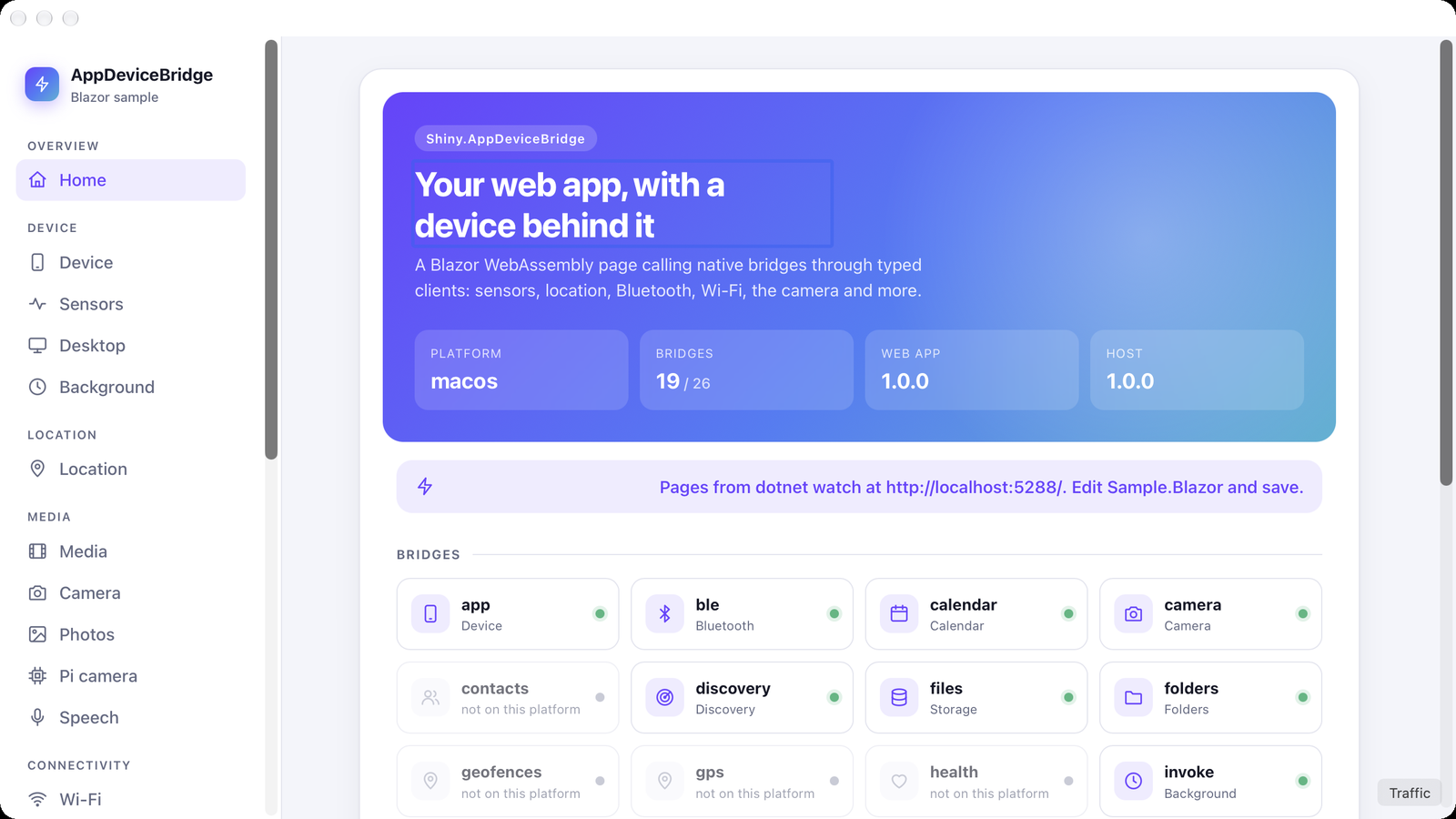
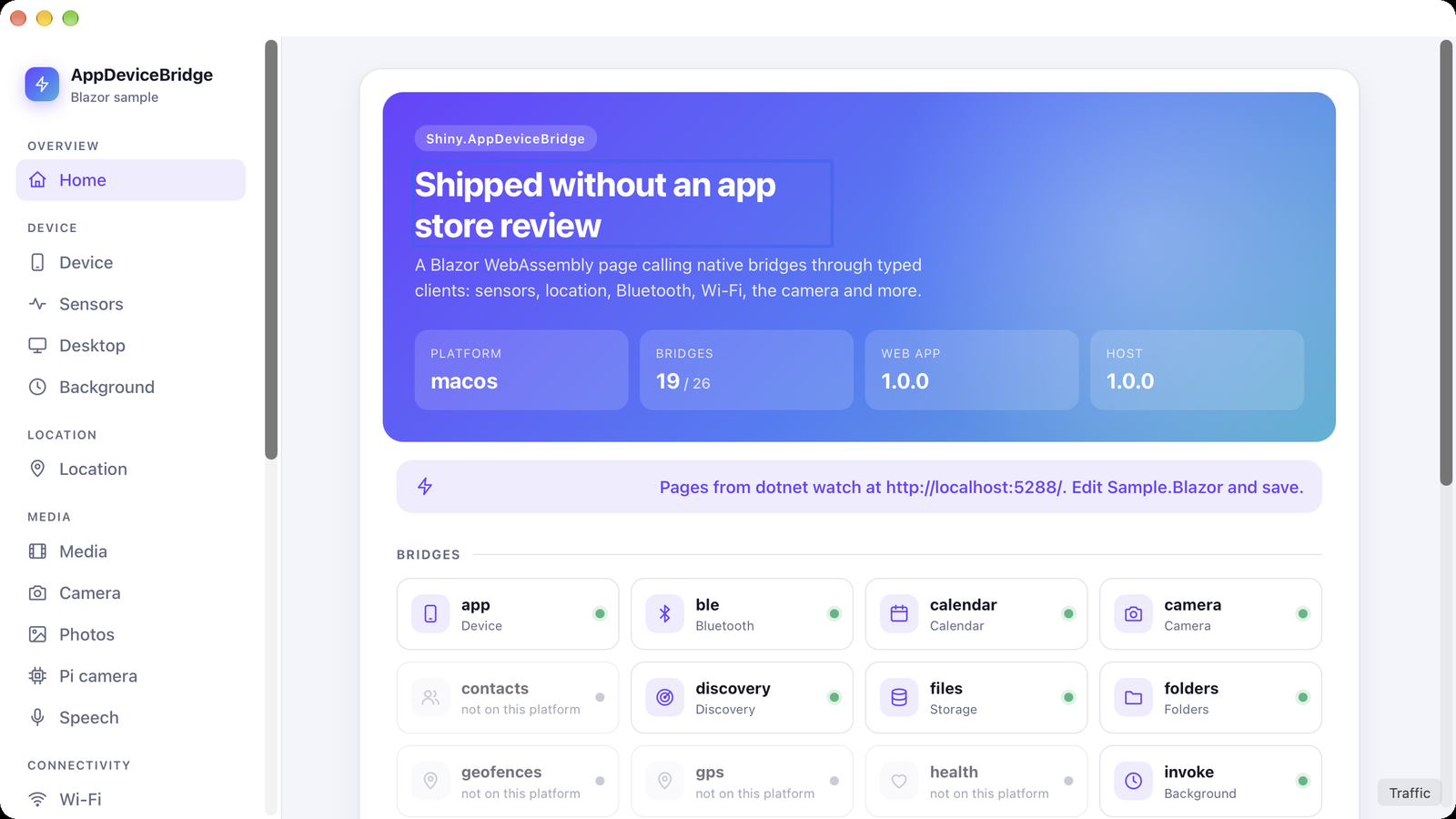
Section titled “Developing the web app with hot reload”In Debug builds the sample sets DevServer. The app on the device or emulator then gets its pages from
dotnet watch on your machine, while the bridge, settings, files and session stay on the device.
cd samples/Sample.Blazordotnet watch run --launch-profile device # listens on http://0.0.0.0:5288Start the app from your IDE as usual. Edit a .razor file and save, and the change appears in the app
without rebuilding it.
| Before | After saving Home.razor |
|---|---|
 |
 |
| Target | Dev server | Hot reload |
|---|---|---|
| Android emulator | http://10.0.2.2:5288 (default) |
yes |
| iOS simulator, Mac Catalyst, macOS, Windows, Linux | http://localhost:5288 (default) |
yes |
| Android over USB | adb reverse tcp:5288 tcp:5288, then build with -p:WebAppDevServer=http://localhost:5288 |
also adb reverse the two socket ports (see below) |
| Any device over Wi-Fi | build with -p:WebAppDevServer=http://<your machine's LAN address>:5288 |
pages only; reload the app to see changes |
How it works:
| Topic | Details |
|---|---|
| At startup | the host probes DevServer for up to 1.5 seconds. If dotnet watch isn’t running, the embedded or installed build is served as usual. -p:WebAppDevServer=off switches dev mode off. |
| Pages | every request outside /_bridge and /_host is forwarded to the dev server. The page keeps its http://127.0.0.1:5780 origin, so its bridge calls still reach the device. |
| Not forwarded | the session cookie never leaves the device, and no update check runs. |
background.js |
fetched fresh from the dev server on every call, so edits apply at once. |
The hot reload socket: dotnet watch tells the page to connect to ws://localhost:<random port>,
and listens on your machine’s loopback only. The host rewrites localhost to the dev server’s host,
which is enough wherever that host reaches your machine’s loopback: the emulator’s 10.0.2.2 and the
simulator’s localhost. A device on Wi-Fi can’t reach a loopback-only listener, so it gets live pages
but not live updates. Over USB, forward the socket ports too; they change each time dotnet watch
starts:
curl -s http://localhost:5288/_framework/aspnetcore-browser-refresh.js | grep webSocketUrlsadb reverse tcp:<ws port> tcp:<ws port>Traffic monitor
Section titled “Traffic monitor”The traffic monitor shows every request the server answers: the web app’s files, bridge calls, your own endpoints,
and the requests the bridge server turns away with 401, 403 or 421. For each request you get the status,
method, path, response size, origin (this device, network or tunnel) and duration. Tap a row to see its headers and
text bodies, and to copy the whole exchange for a bug report. It’s meant for development, so register it in a debug
build:
#if DEBUGbuilder.UseTrafficMonitor(); // Shiny.AppDeviceBridge.Maui#endifOpen it over the web app from a button, gesture or menu item of your own:
var page = new WebAppHostPage();traffic.Clicked += async (_, _) => await page.HostView.ShowTrafficMonitorAsync();TrafficMonitorPage also works on its own, pushed from anywhere or put in a tab
(TrafficMonitorPage.ShowAsync(Navigation)). Without MAUI, http.AddTrafficRecorder() registers the same
TrafficRecorder on the server builder, and you read it through Snapshot() and Changed. A request shows up there once
the server has finished it, which is after its response has gone out, so the client can already have the response.
To read a request straight after making it, in a test for example, wait for it with WaitForAsync(match, ct), or
WaitUntilAsync(condition, ct) for the whole list. TrafficText puts an
exchange into words the way the pages do: Status, Headers, Body, Filter, and Describe for the whole exchange
as text. The simulator shows the same recorder in its Traffic tab.
What it keeps:
| Topic | Details |
|---|---|
| Where | in memory only. Switching recording off throws away everything recorded so far. |
| How much | the newest 300 requests (MaxExchanges). |
| Bodies | text up to 128 KB each (MaxBodyBytes). Binary bodies such as wasm, images and downloads are counted but not kept. |
| Credentials | never kept. The values of Authorization, Proxy-Authorization, Cookie and Set-Cookie, and the token and access_token query parameters, show as (redacted). That covers the WebView’s launch token and session cookie. Edit RedactedHeaders and RedactedQueryParameters to change the list. |
| Your own secrets | RedactRequestBody drops the bodies you name, such as a login post: |
builder.UseTrafficMonitor(o => o.RedactRequestBody = ctx => ctx.Request.Path == "/api/login");While recording is off, the recorder adds nothing to a request’s cost: it allocates nothing and buffers no bodies.
App Store review
Section titled “App Store review”The downloaded content is HTML and JavaScript that runs in WebKit. Guideline 2.5.2 and section
3.3.1(B) of the Apple Developer Program License Agreement allow that, as long as updates don’t change
the app’s primary purpose. Keep native capabilities in the binary (bridges ship with the app), ship a
complete baseline, and use minimumHostVersion rather than shipping web features the installed app
can’t support.