


Bridges
Each bridge is a set of HTTP routes under /_bridge/{name} on the app’s loopback server, plus the events it pushes to
the page. Pick one to see every request — its parameters, body, response and errors — every event and its payload, and
every type they carry. Those reference sections are generated from the bridges’ typed-client declarations, so they
can’t drift from the library.
/_bridge/hostThe host itself: what is serving the page, which bridges it has, and a pending web app update.
/_bridge/settingsKey/value settings in the platform's stores.
/_bridge/filesThe page's own files, confined to named roots the app configured — data and cache by default.
files.roots/_bridge/linksDeep links and universal links.
app.link/_bridge/appThe app and the device it runs on, over Shiny.Core: information, orientation, the screen, settings, the app store, launch at login, battery and connectivity.
app.orientationapp.screenapp.cultureapp.timezoneapp.batteryapp.connectivity/_bridge/deviceThe device's apps and feedback, over .NET MAUI Essentials: the browser, maps, the share sheet, haptics, vibration, keeping the screen awake and the clipboard.
/_bridge/sensorsMotion and environment sensors — accelerometer, gyroscope, magnetometer, compass, barometer and orientation — as live events.
sensors.accelerometersensors.gyroscopesensors.magnetometersensors.compasssensors.barometersensors.orientationsensors.shake/_bridge/gpsGPS: permission, the last and current position, and a listener whose readings arrive as events.
gps.reading/_bridge/motionMotion activity: walking, running, cycling, driving or stationary, as the OS's activity recognition reports it.
motion.activity/_bridge/geocodingReverse geocoding: the addresses at a position, from the platform geocoder (MapKit / CoreLocation on iOS and Mac Catalyst, android.location.Geocoder on Android) or, on Windows, Linux, macOS and Android devices without a geocoding backend, OpenStreetMap's Nominatim.
/_bridge/geofencesGeofences: monitor circular regions and hear when the device enters or leaves one.
geofence.status/_bridge/regiongeofencesRegion geofencing: GPS-driven monitoring of polygon, proximity and reverse-geocoded regions, with no platform limit on how many.
regiongeofence.change/_bridge/beaconsBeacons: range iBeacons in the foreground, monitor iBeacon regions in the background, scan for Eddystone frames, and advertise the device as a beacon.
beacons.rangedbeacons.regionbeacons.eddystone/_bridge/bleBluetooth LE central: scan, connect, discover services and characteristics, read, write and subscribe to notifications.
ble.scanble.statusble.notificationble.error/_bridge/obdOBD-II through one ELM327 or OBDLink adapter at a time, over Bluetooth LE or Wi-Fi: find and connect to an adapter, read values, the VIN and trouble codes, and monitor readings live.
obd.readingobd.disconnected/_bridge/printersReceipt and label printers — ESC/POS or TSPL over Bluetooth LE or the network (raw TCP, port 9100), one at a time: find and connect to a printer, then print receipts built in the page.
printers.disconnected/_bridge/printingThe operating system's own printing — AirPrint on iOS and Mac Catalyst, the print dialog on Android, the spooler on Windows, CUPS on Linux and macOS — for any printer it knows.
/_bridge/wifiWi-Fi: scanning, the current network, joining and forgetting networks, the radio, and a hotspot.
wifi.changedwifi.hotspot/_bridge/discoveryLocal network discovery over mDNS/Bonjour, SSDP/UPnP and WS-Discovery: search for a window, browse with results as events, resolve one, and advertise this app.
discovery.mdnsdiscovery.ssdpdiscovery.wsddiscovery.errordiscovery.stopped/_bridge/hubsUniversal Hubs whose logic lives in the web app — and joining other devices' hubs (clients).
hubs.streamhubs.client.hosthubs.client.pushhubs.client.statushubs.client.stream/_bridge/notificationsLocal notifications: permission, sending now or on a schedule, repeating or on entering an area, the pending list, cancelling, the app badge and Android channels.
notification.entrynotification.received/_bridge/pushPush notifications: registration, the token, tags, and what arrives.
push.tokenpush.unregisteredpush.receivedpush.entry/_bridge/transfersBackground HTTP transfers that keep going while the app is suspended: downloads into a file root and uploads from one.
transfer.progresstransfer.completedtransfer.failedtransfer.cancelled/_bridge/wearablesThe companion app on a paired Apple Watch or Wear OS device.
wearables.statuswearables.messagewearables.contextwearables.transferwearables.filewearables.completed/_bridge/liveactivitiesLive activities: iOS/iPadOS Live Activities on the Lock Screen and in the Dynamic Island, and Android 16 Live Updates (an ordinary ongoing notification on older Android).
liveactivities.startedliveactivities.stateliveactivities.tokenliveactivities.starttoken/_bridge/purchasesIn-app purchases — consumables, non-consumables and auto-renewable subscriptions — through the App Store (StoreKit 2) on iOS and Google Play Billing on Android.
purchases.updated/_bridge/mapsVector maps the page draws with MapLibre or any other vector-tile renderer.
maps.download/_bridge/directionsTurn-by-turn directions.
/_bridge/healthHealthKit on iOS and Health Connect on Android: request access per type, read samples, write them, and watch a type for new readings.
health.readinghealth.stopped/_bridge/speechOn-device speech recognition and text-to-speech.
speech.partialspeech.resultspeech.keywordspeech.endedspeech.spokenspeech.error/_bridge/screenrecorderRecords the device's screen to a video filed into a file root.
screenrecorder.statusscreenrecorder.ended/_bridge/sharetargetContent other apps shared to this one: text, a link, files.
sharetarget.received/_bridge/contactsThe device's address book: search and page through contacts, read one, create, update and delete, and fetch photos.
/_bridge/calendarThe device's calendars, from the page.
/_bridge/photosPhotos, two ways.
/_bridge/foldersFolders the user picks with the platform's own picker.
/_bridge/databaseA database client on the device: SQLite files in the app's file roots, opened where they lie so a 4GB file costs a page of rows rather than 4GB; and database servers a driver the app registered can reach, which a page cannot open a socket to.
/_bridge/traySystem tray and menu bar icons on Windows, macOS and Linux: create and update them, give them menus, show notifications, animate them, and hear clicks and menu choices.
tray.clicktray.menu/_bridge/quickentryQuick entry: a prompt window that opens over other applications — from a global hotkey, a tray click or the page — in the style of Spotlight or a desktop assistant.
quickentry.submittedquickentry.suggestionquickentry.cancelledquickentry.microphonequickentry.openedquickentry.closed/_bridge/cameraThe device's own camera, driven from wherever the page is — a laptop across the room from a phone on a mount.
camera.status/_bridge/rpicameraA Raspberry Pi camera through libcamera: the cameras attached, JPEG snapshots, photographs written into a file root, and sensor controls.
/_bridge/agesignalsThe user's age range as the app store shares it — Apple Declared Age Range (iOS and macOS 26+) and Google Play Age Signals — for app store accountability laws such as Texas SB 2420, and for any app that gates features by age.
/_bridge/aiConversations with the app's AI model: persisted sessions that stream their replies as events, ask typed questions, remember things across sessions, and can be talked to through the voice loop.
ai.turn.startedai.deltaai.toolai.questionsai.turn.endedai.messageai.stateai.usageai.titleai.compactedai.memoryai.errorai.voice.stateai.voice.transcriptai.voice.speakingai.voice.interruptedai.voice.levelai.voice.error/_bridge/audioThe device's speakers and microphone: play clips, read and set the system volume, record the microphone to WAV, list audio routes, and route the microphone live to the output.
audio.playback.endedaudio.playback.levelaudio.volumeaudio.recording.levelaudio.recording.endedaudio.devicesaudio.monitor.levelaudio.monitor.ended/_bridge/barcodesScans barcodes with the device's camera: the device shows its own scanner, full screen, and the codes it reads come back to the page.
barcodes.detected/_bridge/biometricsVerifies the device owner with the platform's own biometric prompt: Touch ID, Face ID and Optic ID on iOS, Mac Catalyst and macOS, fingerprint, face and iris on Android, and Windows Hello.
/_bridge/calldirectoryCall blocking and caller identification from a list of numbers the app owns: iOS loads it through a Call Directory extension, and Android screens calls against it.
/_bridge/gamesAchievements, leaderboards and friends through Apple Game Center (iOS, Mac Catalyst, macOS) and Google Play Games (Android).
games.player/_bridge/nfcReads and writes NDEF NFC tags: URLs, text, MIME payloads, smart posters and Android app records.
nfc.tagnfc.scan/_bridge/vpnThe app's one profile in the operating system's built-in IKEv2 VPN client.
vpn.statusThe routes are the wire protocol. A page doesn’t build them by hand: every bridge has a typed client, in C# for Blazor and in TypeScript for everything else, generated from one declaration so the two can’t drift — see Typed clients.
@inject IAppBridge App@inject IGpsBridge Gps
var info = await App.GetInfoAsync();await using var readings = await Gps.OnReadingAsync(reading => { position = reading; return Task.CompletedTask; });
import { AppBridge, GpsBridge } from "@shinyorg/appdevicebridge";
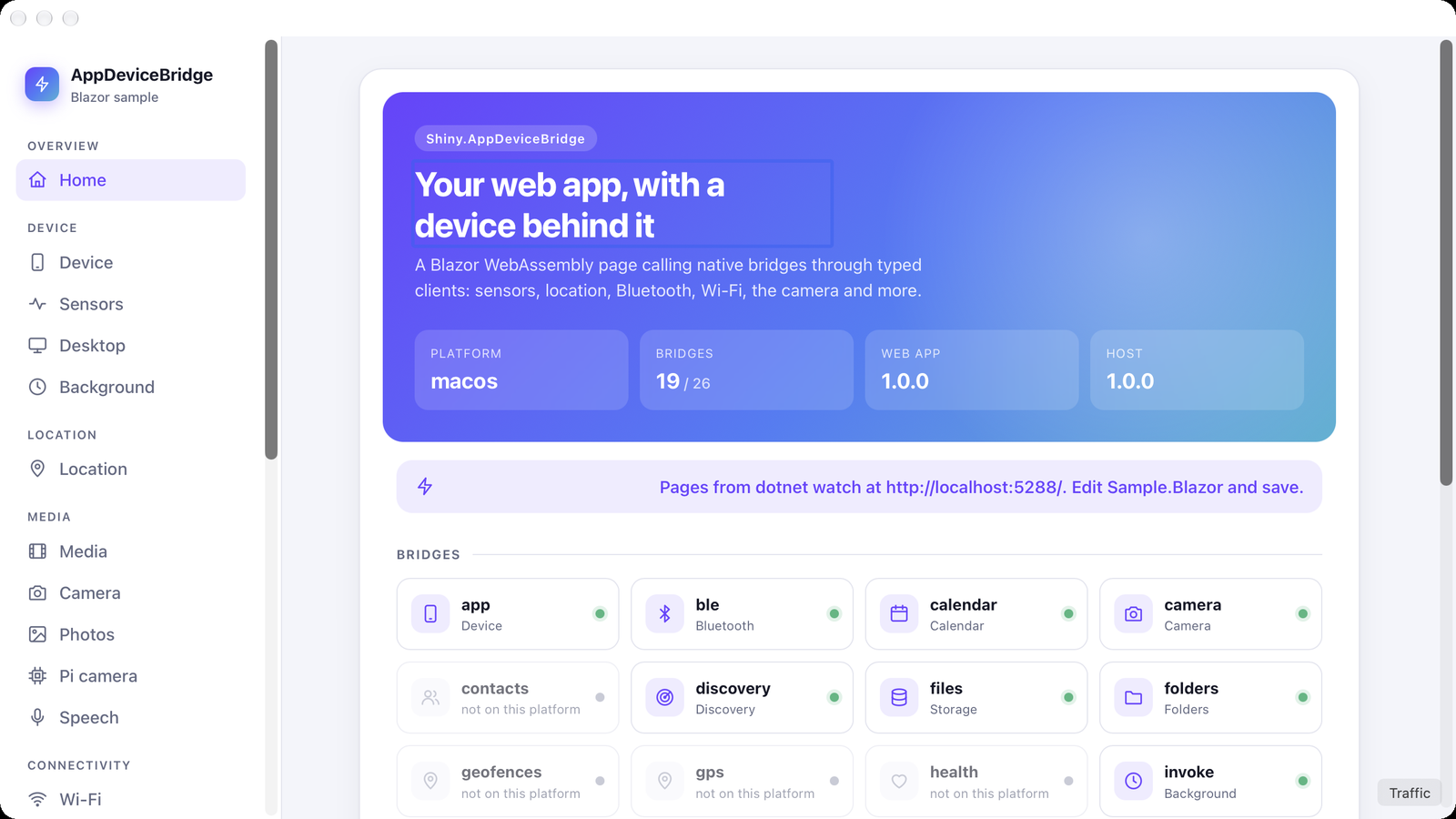
const info = await new AppBridge().getInfo();const stop = await new GpsBridge().onReading(reading => console.log(reading.latitude));GET /_bridge/host lists every bridge and whether this platform supports it. A bridge with no implementation on a
platform answers 501, so a page can grey it out instead of failing. The sample on macOS, where contacts, GPS,
geofences and health aren’t available:
Events
Section titled “Events”Every event reaches the page over one Server-Sent Events stream, GET /_bridge/events, and the page names the events it
wants on it. The typed clients do this for you: each On…Async / on… subscription adds its event to the stream, and
disposing the last subscription to an event drops it.
const events = new EventSource("/_bridge/events?topics=gps.reading,app.battery");events.addEventListener("bridge.stream", e => streamId = JSON.parse(e.data).id);events.addEventListener("gps.reading", e => show(JSON.parse(e.data)));
// later, without reconnectingawait fetch(`/_bridge/events/${streamId}`, { method: "PUT", body: JSON.stringify({ topics: ["gps.reading"] }) });- Only what’s listened to runs. Behind each event is an async stream on the host that hooks the native source when a page asks for the event and unhooks it when the page drops the event, disconnects, or the source fails. Nothing stays attached to the battery, the network or a sensor for a page that’s gone.
- Sessions follow their listeners. A BLE scan or characteristic subscription, a Health listener, an OBD monitor,
a Discovery browse, dictation and each sensor stop once nothing listens to their events any more. Starting one of the
first five without a listener answers
409not_listening, so subscribe first. The client methods resolve once the host is delivering the event, soawaitthe subscription and then start. GPS and motion listeners keep running without a page, because background.js receives their readings too. bridge.streamcomes first on every connection, including an automatic reconnect, and carries the id thatPUT /_bridge/events/{id}with{ "topics": [...] }takes. It replaces the stream’s topics, and names nothing maps yet are kept for when something does. At most 64.bridge.error{ "event", "message" }means an event’s source failed, such as a feature the device lacks, and that event was dropped from the stream. Naming it again retries.- One connection. The WebView talks HTTP/1.1 to the loopback server, with about six connections per origin shared by everything the page does, so every event shares one stream rather than holding a connection each.
- Best effort. Nothing is buffered while a page isn’t listening, and a page more than a few hundred events behind
loses the oldest. A page that closes without a word is noticed at the next write; an idle stream writes a heartbeat
every
EventStreamHeartbeat(15 s) so that happens promptly.
Errors
Section titled “Errors”Errors return { "code": "...", "message": "..." }. The clients throw BridgeException (C#) or BridgeError
(TypeScript) carrying the status and code, so pages can switch on either. Each request in a bridge’s reference lists
the statuses it can answer with; the ones every bridge shares:
| Status | Means |
|---|---|
400 |
The body or a parameter is invalid — a missing field, a value out of range. |
404 |
The thing the route names doesn’t exist: a file, a region id, a transfer, a contact. |
409 |
The device is in the wrong state for it — another session is running, nothing is connected, or not_listening: a session that streams events was started before the page subscribed to them. |
501 |
Not on this platform. GET /_bridge/host reports which bridges are supported, so a page can grey a feature out up front instead. |
try { status = await new BluetoothLEBridge().getStatus();} catch (e) { if (e instanceof BridgeError && e.isNotSupported) hideBluetooth(); // 501 else throw e;}